
.svg)
AP Approvals That Route the Way You Actually Operate
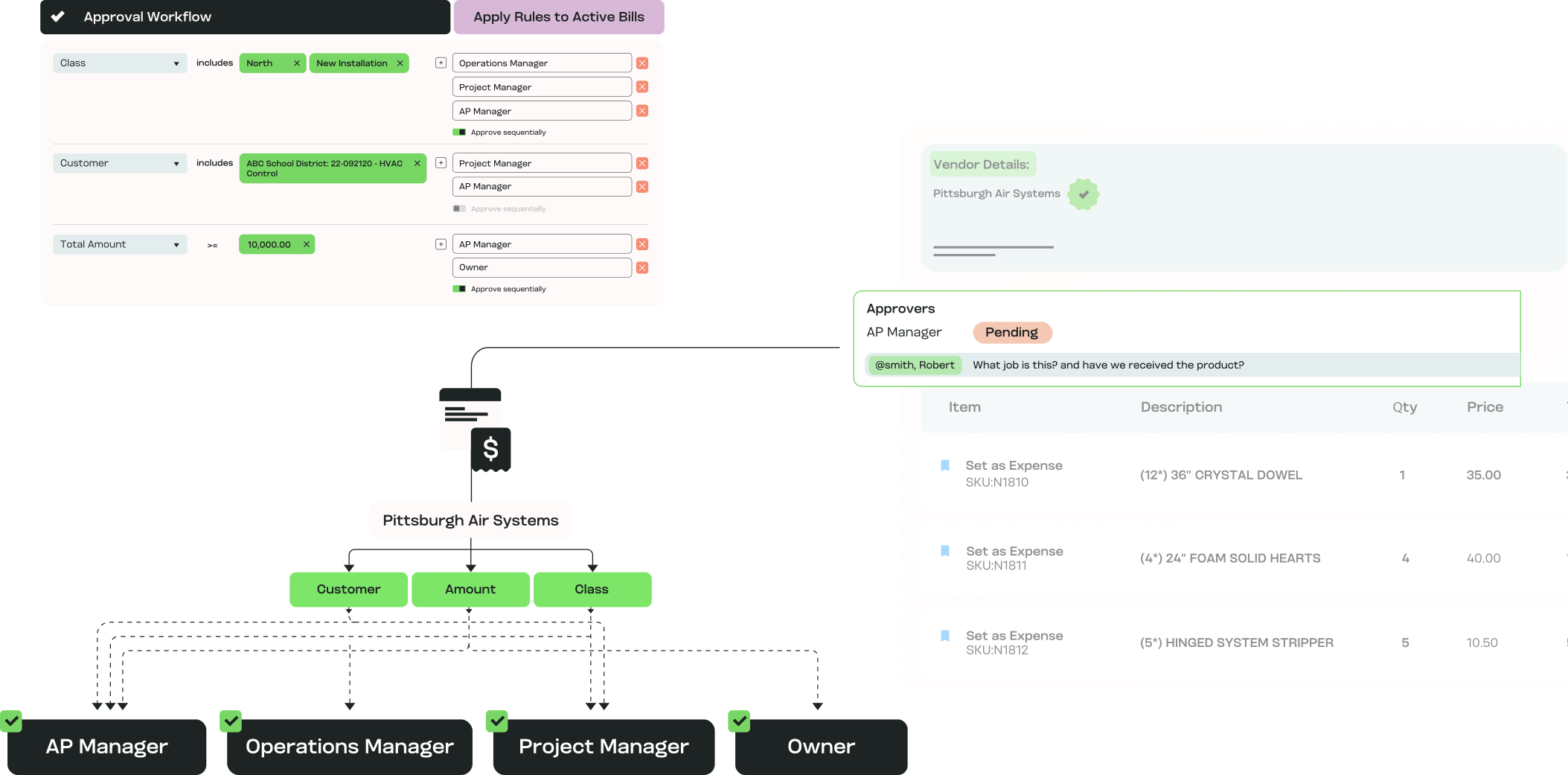
MakersHub routes by vendor, project, GL code, department, or amount, in sequence or in parallel, so multi-step AP approvals follow your actual workflow. Finance, project managers, and vendors stay in one thread instead of a buried email chain.
.avif)
High Volume, High-Detail AP
Approval routing matters most when the chain of command is real and the person approving is rarely at a desk. That describes:

Construction finance leads
Bills routed to the PM who owns the job, then to finance, with field approvals from a phone.

Trades owner-operators
The owner approving from a truck between calls, without opening the whole accounting system.

Manufacturing controllers
Approvals routed across departments and up to executives for high-value spend.

Accounting and CPA firms
Client-side approvers and firm staff in one chain, each seeing only what is theirs.
How Approvals and Collaboration Work for You

Bill Approval vs Payment Authorization
The person who reviews a bill isn't always the one who releases the funds. MakersHub keeps the two steps separate, so approval sits with the reviewer and payment authorization sits with finance.

Built for Complexity
Route bills by vendor, project, GL code, department, or amount. Your AP approval automation mirrors how your business already runs.

Speed + Control
Approvers see only the bills assigned to them, so nothing waits behind items that aren't theirs to review. Oversight is maintained without slowing the queue.

Collaboration Without Clutter
Finance comments and tags in-app. Project managers see only their jobs. Vendors receive bill summaries by email with no login required. The conversation stays attached to the bill.

Transparency for Everyone
Bills, approvals, and comments live in one record. Anyone with access can see where a bill stands and read the full audit trail behind it.
What Routing Looks Like in Practice
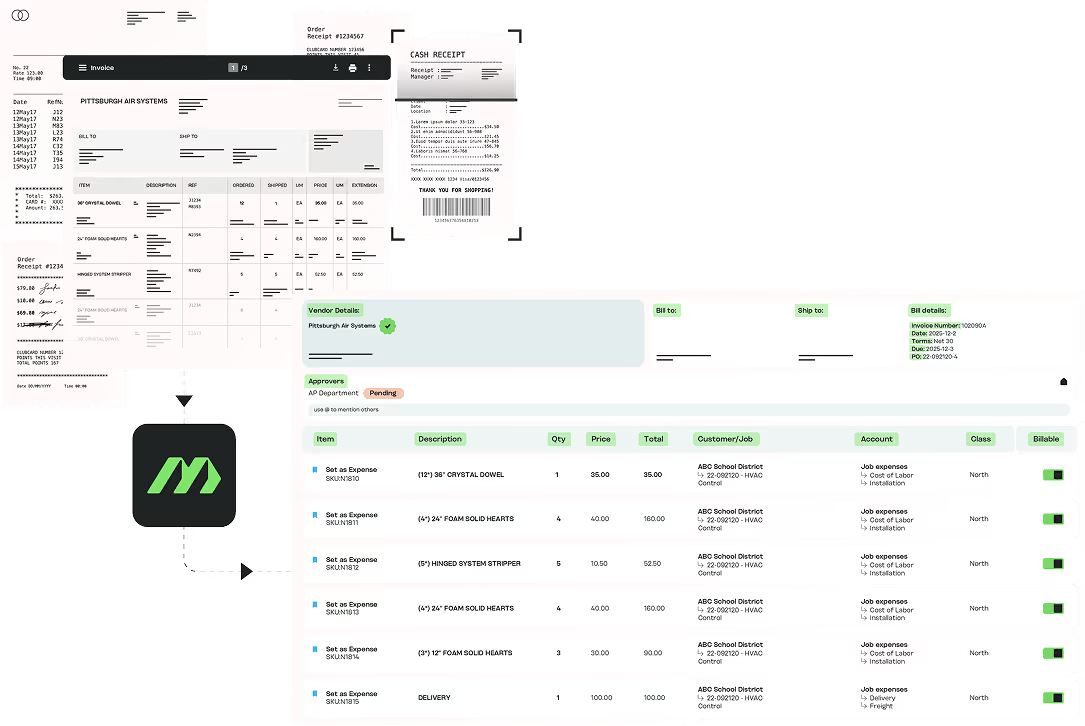
Automation is Only as Good as your Data
MakersHub captures vendor, totals, line items, GL codes, projects, customers, and jobs before routing, so each approver reviews the bill with its full context already attached.
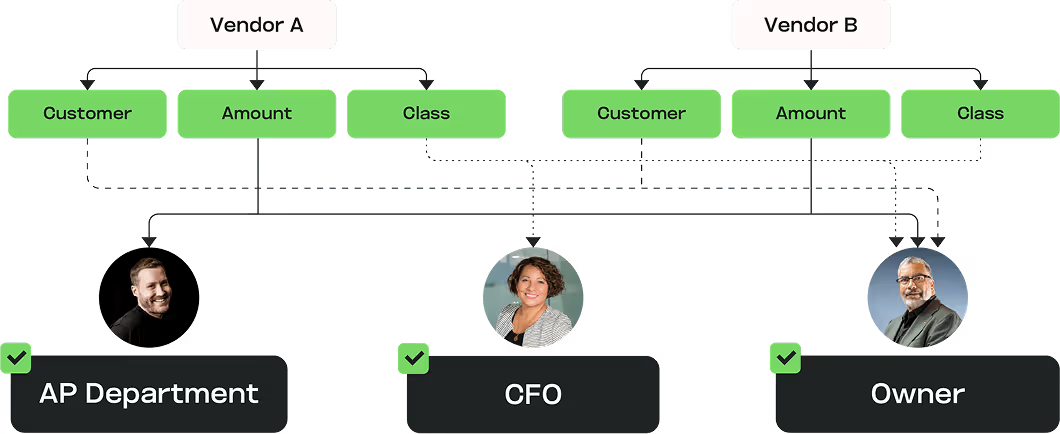
Contextual, Multi-Step Approvals
Project managers, department heads, finance, and executives can each sit in the chain, with high-value spend routed for extra sign-off. Steps run in sequence when order matters or in parallel when it doesn't.
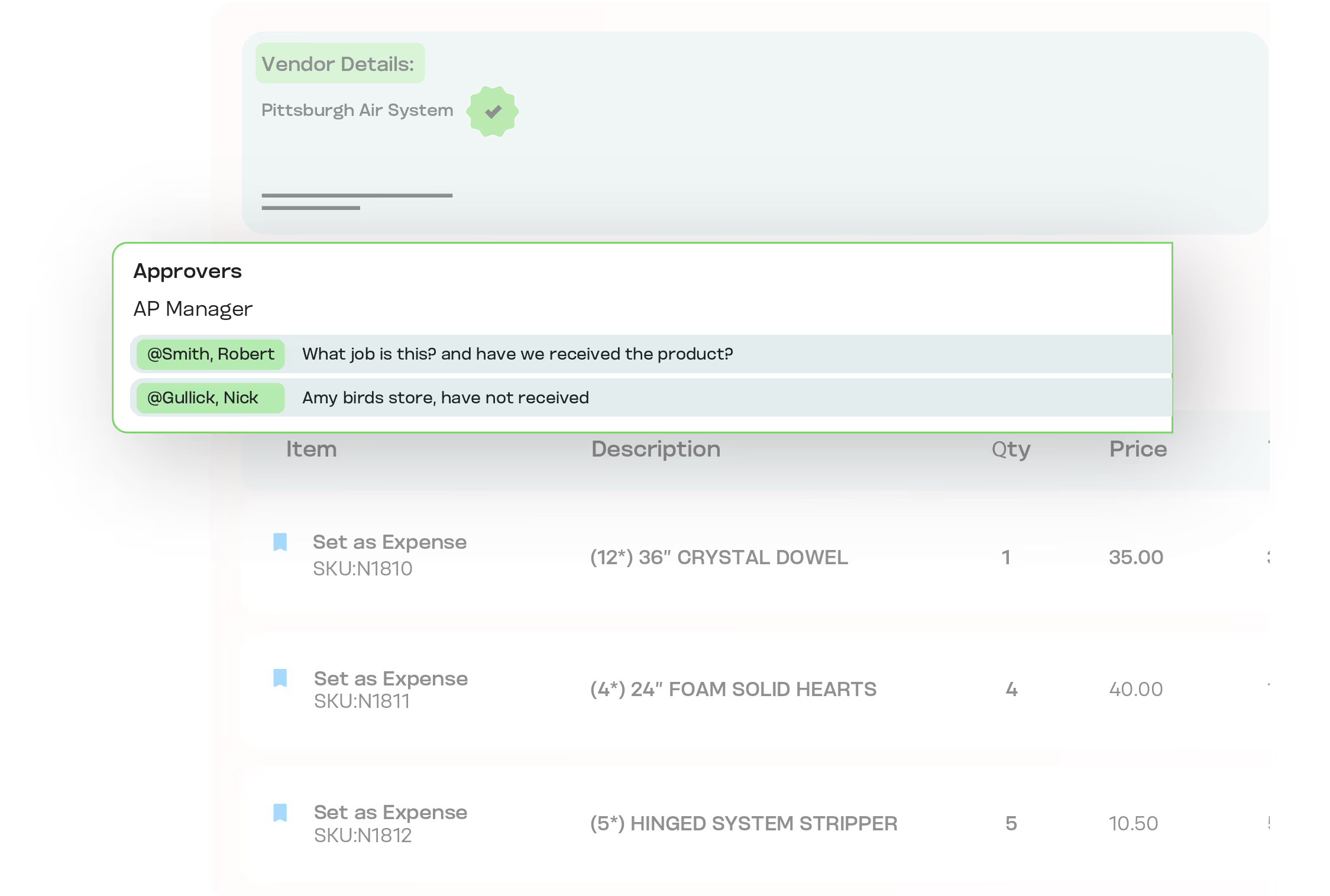
Collaboration in Real Time
Finance tags colleagues, leaves comments, and resolves questions on the bill itself. Vendors get bill summaries by email with links to the original, so they stay informed without a MakersHub account.
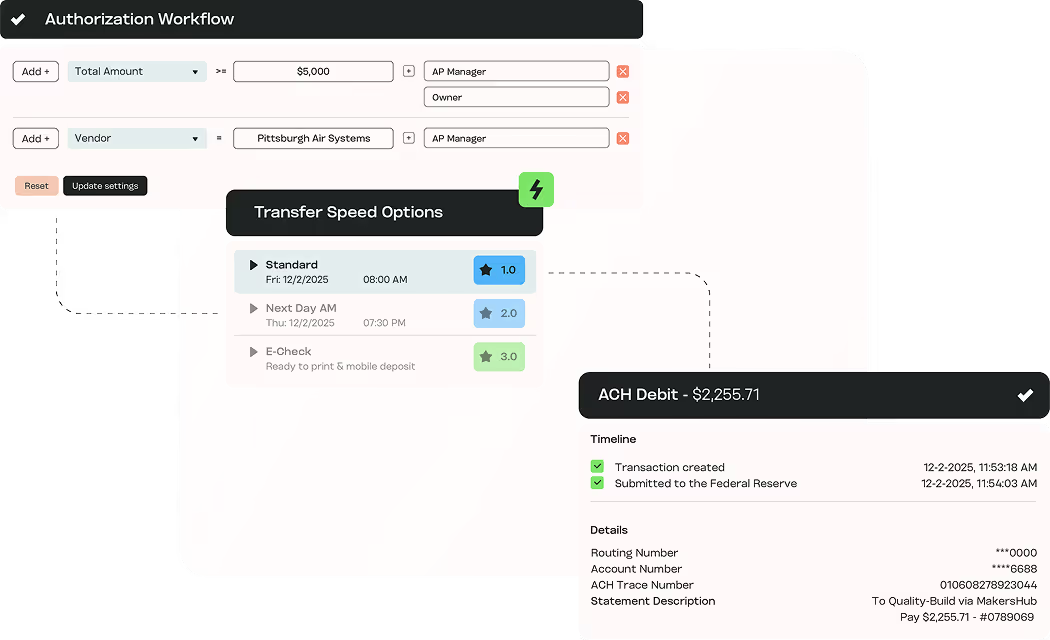
Enforcing Separation by Design
Role-based permissions and configurable workflows keep bill approval and payment authorization in different hands. The centralized audit trail records both, so accuracy at the bill level and control at the payment level are enforced, not assumed.
Experience the difference firsthand
The Tools That Power Approvals and Collaboration

Approvals Anywhere
Approve from any device or straight from email, even out of the office.

Personalized Inboxes
Each approver sees only the bills assigned to them.

User Groups & Delegation
Assign a group or delegate when someone is unavailable, so bills never stall.

Sequential or Parallel Workflows
Enforce a strict order or allow simultaneous multi-step approvals.

In-App Comments & @Mentions
Keep every conversation tied to its bill.

Email Notifications
Approvers and vendors stay updated without logging in.

Centralized History
Every approval, comment, and vendor message logged in one place.
In Their Words
“What we love most about MakersHub is its ease of use. The fact that it is sophisticated enough to be used by our multiple locations and managers that need to have clear exposure in order to approve bills timely and then move through our multi layered internal approval process is a game-changer.”


Santo Pernicano, General Manager
Liberty Fence & Supply, LLC

Map Your Approval Chain in 20 Minutes
Book a walkthrough and we will build one of your real routing rules live, entity, job, and sign-off included.
Approval Routing vs the Alternatives
What you need
MakersHub
Email / manual routing
Dollar-threshold-only tools
Routing logic
Vendor, project, GL, department, or amount
Whoever gets forwarded the email
Dollar amount only
Sequence
Sequential or parallel steps
Ad hoc, easily skipped
Usually single-step
Field approval
From phone or email
Possible but untracked
Varies
Approver view
Only the bills assigned to them
Full inbox, full visibility
Limited control
Separation of duties
Approval and payment authorization split
Manual, easy to breach
Often not enforced
Audit trail
Every action logged on the bill
Scattered across inboxes
Partial
FAQs
Most AP tools rely on single-threshold routing, which ignores context. MakersHub adapts approvals by vendor, project, GL code, and more, giving you context-aware AP approval automation.
No. Approvals can run in sequence or parallel, and each approver only sees what’s relevant to them.
Yes. Project managers, department heads, and executives can all be part of your accounts payable approvals, with personalized inboxes showing only what matters to them.
MakersHub supports user groups and delegated approvals so bills never get stuck.
No. Vendors receive email summaries with links to original bills, so they stay informed without logging in.
Yes. All approvals, comments, and vendor communications are logged for full traceability.
Yes. A PM sees only the bills tied to their jobs and approves from a phone or email. They never get access to the full accounting system, so field approvals stay fast without exposing company-wide financials.
Yes. A bill belonging to one entity routes to a different set of approvers than a bill belonging to another. Routing reads the entity, the project, and the spend, so each follows its own chain of command.
Client-side approvers and firm staff can sit in the same chain, each seeing only what is theirs. The firm keeps oversight while the client approves their own bills, with every step logged.
Route Every Bill to the Right Approver
Approvals that follow your chain of command, with the full context attached and the audit trail behind it.