
.svg)
Resources
Product Updates
Stay up to date with the latest improvements to MakersHub. Here you’ll find new feature announcements, performance enhancements, and quality-of-life updates - all designed to help you work smarter.

Feature Release
August 12, 2026
Sync Bill Attachments to QuickBooks Online and Xero
MakersHub can now sync bill and vendor credit attachments directly to QuickBooks Online and Xero. This gives teams access to the original documents inside their accounting system when attachments are needed for record keeping or invoice workflows.
Sync bill, vendor credit, and supporting documents to QuickBooks Online, including IES, and Xero.
Automatically add new or updated documents after the initial bill sync.
Re-sync attachments for existing records directly from the integration record window.

Recent Releases
Centralized Recurring Transaction Management
MakersHub now allows master accounts to manage recurring transaction templates across all linked entities from one centralized location. Users can view, edit, duplicate, and filter templates without having to navigate into each entity individually.
Centralized Management: View and manage recurring transaction templates across linked entities directly from the master account.
Flexible Template Controls: Edit and duplicate recurring transaction templates across linked entities.
Advanced Filtering: Quickly find templates by entity, template name, or vendor for easier organization and management.

Approval Status and Activity Filtering Enhancement
MakersHub has expanded its filtering options to make it easier to find records based on approval status and user activity. Users can now identify records with requested changes or partial approvals, as well as filter by who approved, rejected, or commented on a record.
Expanded Approval Status Filtering: Find records marked as Changes Requested or Partially Approved using the Approvers filter.
Approval and Rejection History: Use Advanced Filter to find records approved or rejected by a specific user or user group.
Comment Activity Filtering: Quickly locate records containing comments from a specific user, making it easier to track discussions and follow-up activity.

Invoice Group Drag to Merge Enhancement
MakersHub now makes it easier to organize and merge documents within an Invoice Group using a simple drag-and-drop interface. Users can combine invoice records or attach supporting documents without manually categorizing, searching for, and linking records.
Simple Drag-and-Drop Merging: Merge records directly within an Invoice Group without navigating between individual documents.
Two Flexible Merge Options: Choose Merge into One to combine and reconcile information from multiple records, or Merge as Support Document to attach related pages without including their information in invoice extraction.
Smarter Document Grouping: Automatically match invoices with their corresponding purchase orders using purchase order numbers, while making it easy to manually associate documents that cannot be matched automatically.
Invoice Group Navigation and Management Enhancement
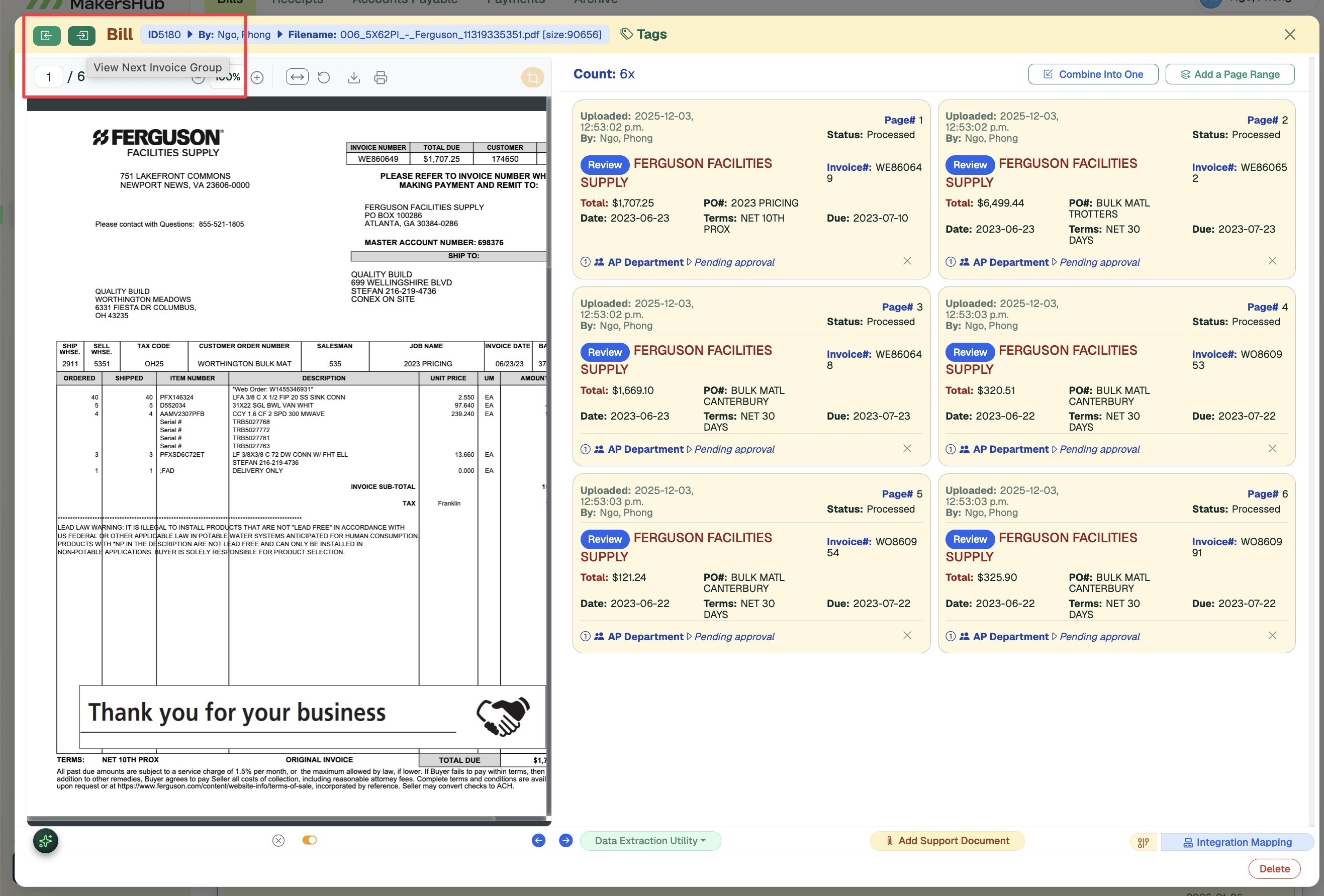
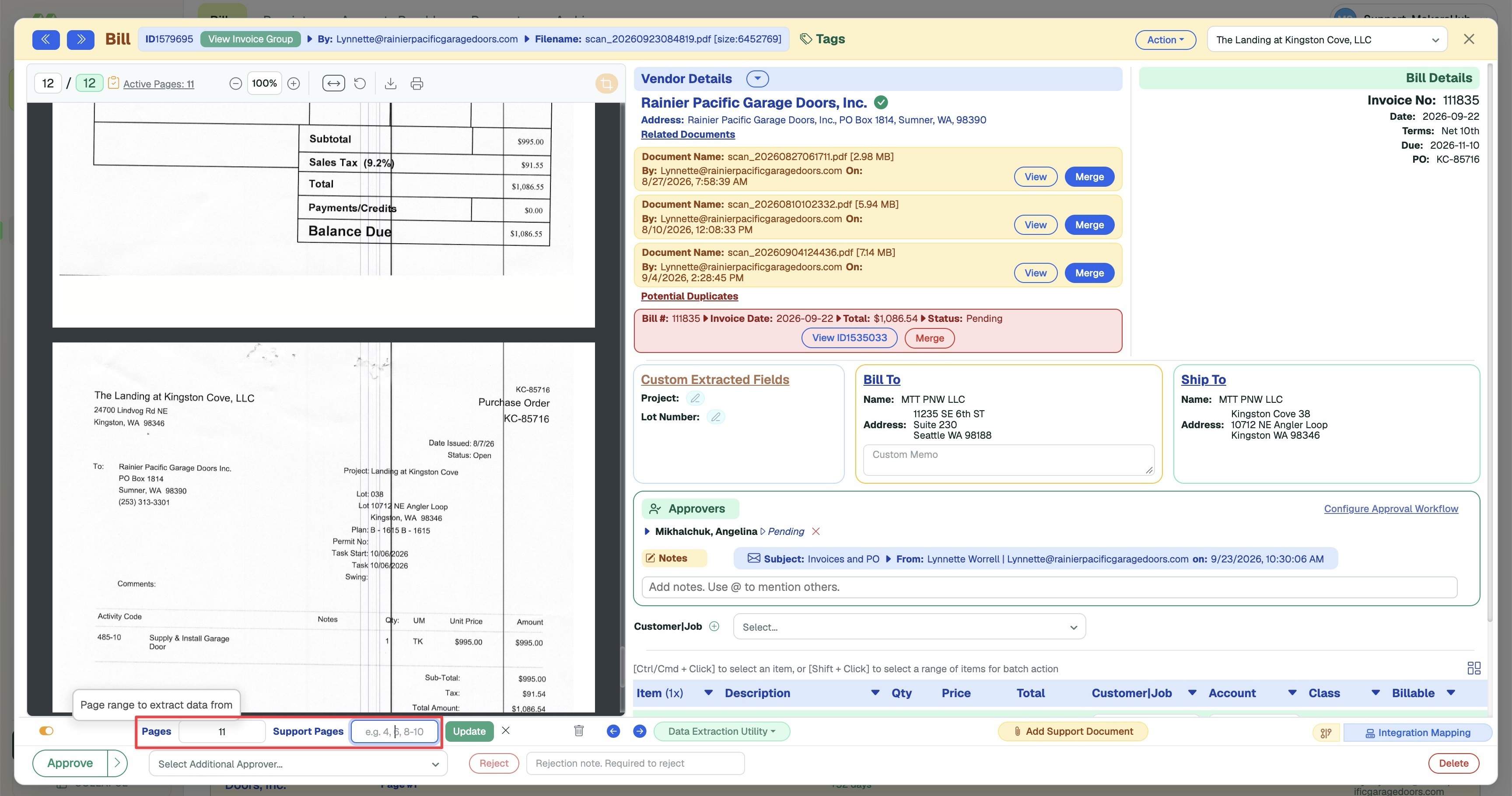
MakersHub has improved Invoice Group navigation and management, making it easier to move between groups, access related invoices, and organize invoice pages. Users can now navigate directly between Invoice Groups, open groups with one click, and specify flexible page ranges when combining or adding invoice pages.
Group-Level Navigation: Use the Next and Previous buttons to move directly between Invoice Groups instead of individual invoices.
One-Click Group Access: Open an Invoice Group directly from an individual invoice while preserving the current page position.
Flexible Page Selection: Use printer-style page ranges, such as 1-3, 5, 7-9, with the Combine Into One and Add a Page Range actions.

Automated Utility Invoice Processing
MakersHub can now process utility invoices in a single pass, automatically identifying vendors, matching properties and units, assigning accounting details, and formatting invoice information. This reduces manual data entry and prepares invoices for faster review, approval, and synchronization with QuickBooks Online.
Intelligent Vendor and Property Matching: Automatically identifies the vendor and account number, then matches the invoice to the correct apartment complex, unit, and customer/job.
Complete Accounting Assignments: Assigns utility codes, apartment codes, classes, and locations while generating standardized line item descriptions.
Automated Invoice Numbering: Creates invoice numbers using the utility code, apartment and unit information, and invoice date, preparing invoices for streamlined approval and QuickBooks Online synchronization.
WiseVision Automated AP Workflow
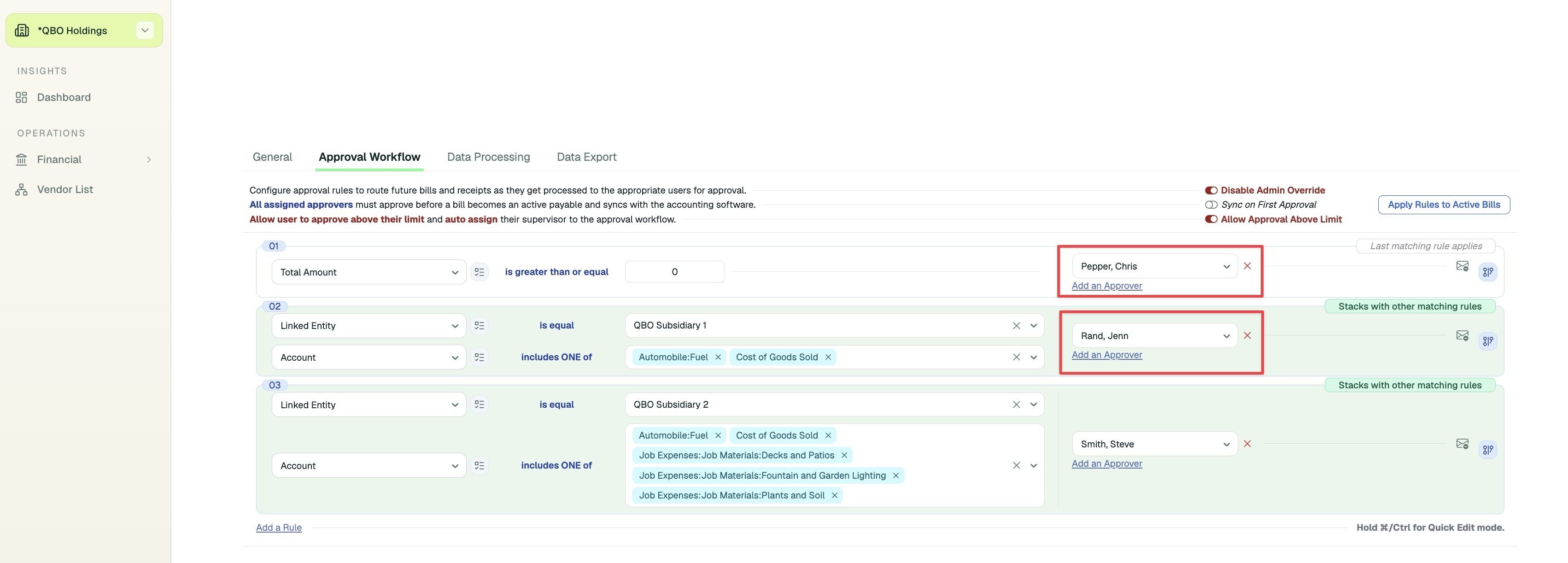
WiseVision can now connect data extraction, invoice mapping, entity assignment, and approval routing into one automated workflow. This reduces the need for reviewers to open and manually process bills before the correct coding and approvers can be determined.
Automatically applies entity and invoice mapping rules before a reviewer opens the bill.
Uses vendor-specific training and business rules to improve multi-page invoice splitting.
Determines the appropriate approval workflow after coding and mapping have been applied.
Multi-Factor Authentication (MFA)
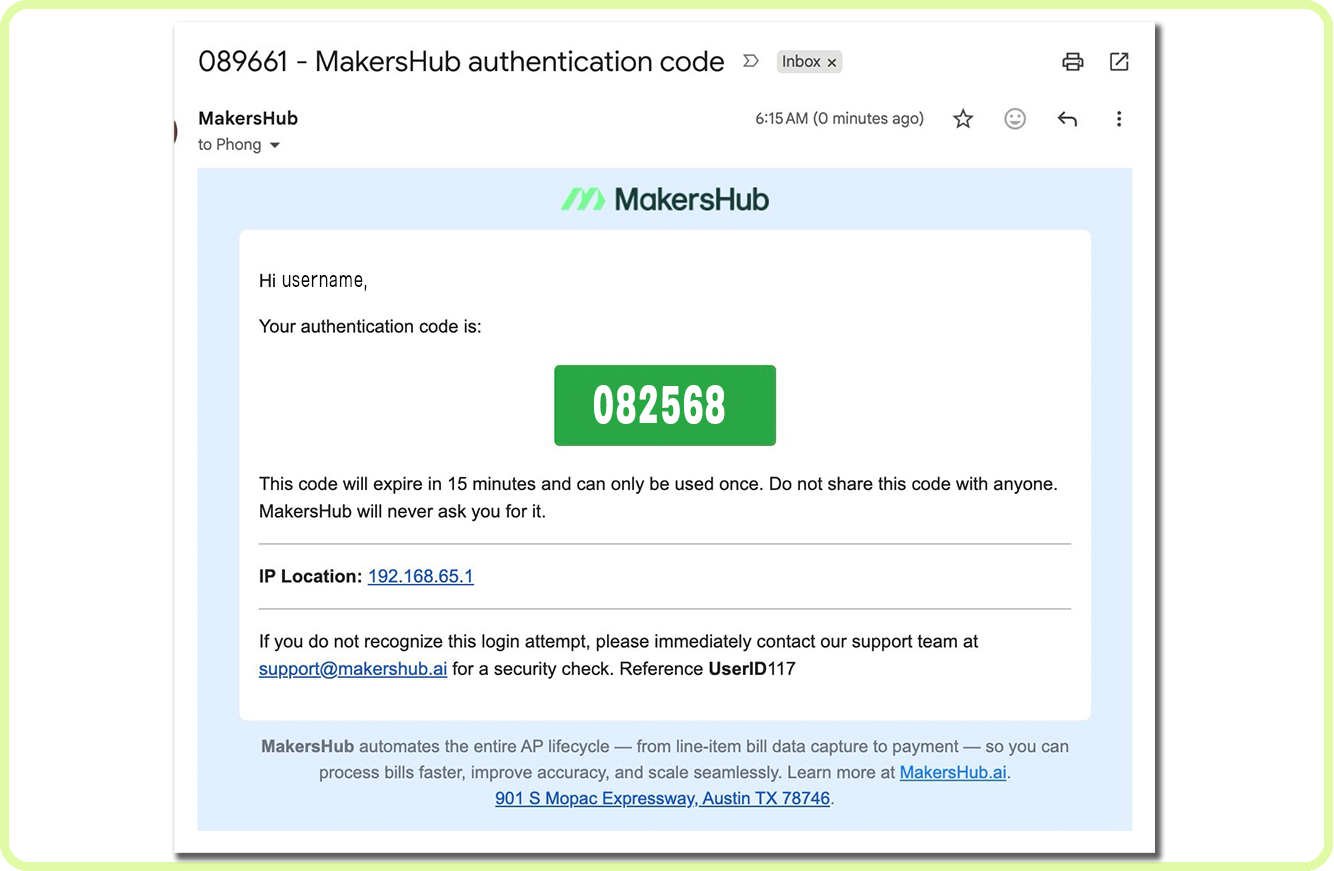
MakersHub now supports multi-factor authentication (MFA) for an added layer of account security. Admins can require MFA across the entire company or enable it for individual users.
Enable MFA company-wide or for individual users from User Settings.
Adds an additional verification step after a user enters their email and password.
Sends a time-limited, one-time passcode to the user’s registered email address.

Invoice and Line Item Allocation Templates
Users can now apply reusable templates to an entire invoice or selected line items, making it easier to split costs across entities, projects, classes, cost codes, and other categories. Templates can automatically scale allocations to match the invoice or selected item total.
Apply allocation templates to an entire invoice or only selected line items.
Automatically scale template amounts to match the bill total or selected line item total.
Create templates from recurring transactions, import them from a spreadsheet, or turn an existing invoice into a recurring template.
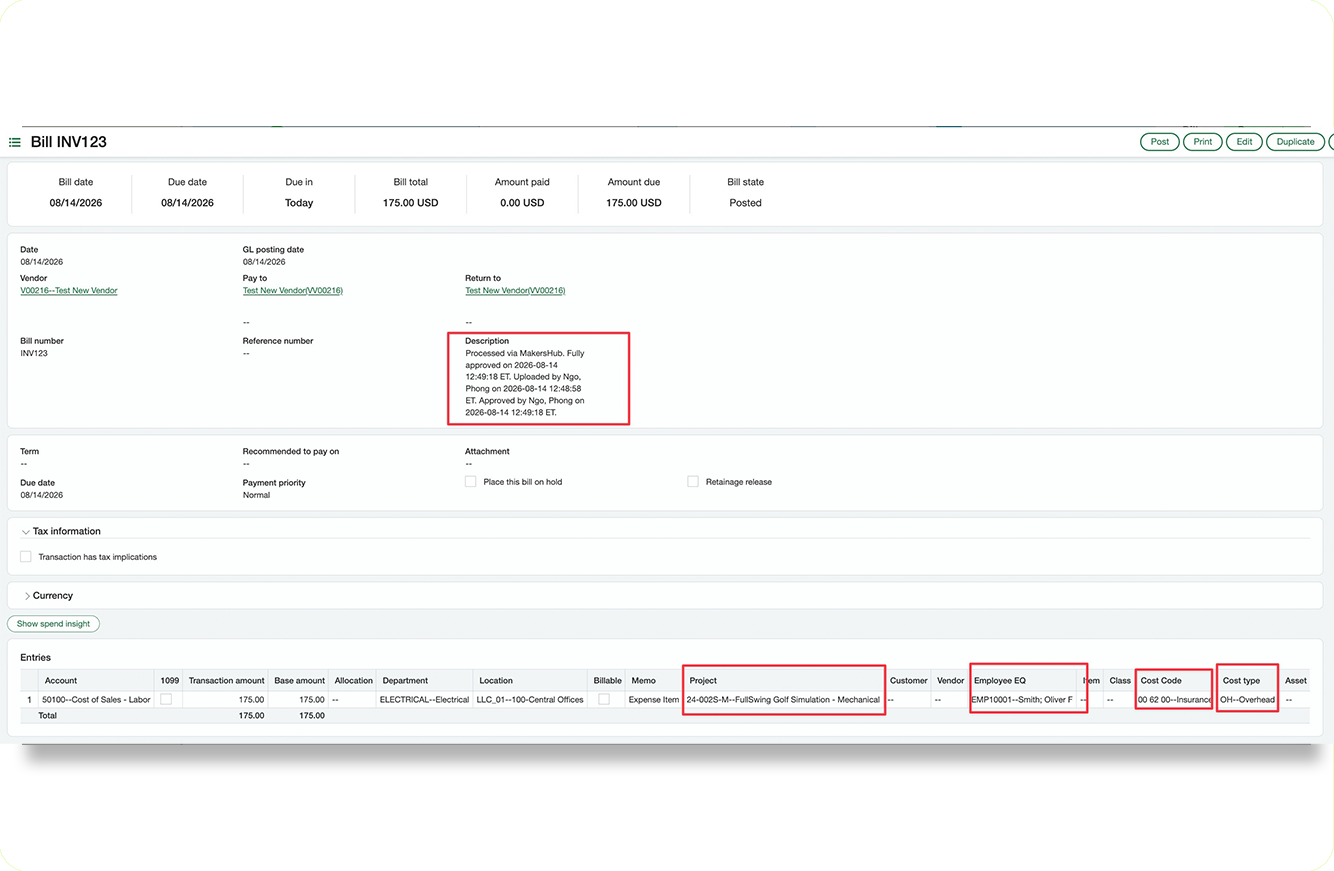
Sage Intacct Construction Support
MakersHub now supports Sage Intacct’s Construction module, including new construction-specific fields and smarter filtering between related selections. This helps users choose only valid combinations of projects, cost codes, and cost types.
Adds support for Employee/EQ, Project, Cost Code, and Cost Type fields.
Dynamically filters available Cost Codes based on the selected Project.
Dynamically filters Cost Types based on the selected Project and Cost Code combination.
Sync Bill Attachments to QuickBooks Online and Xero
MakersHub can now sync bill and vendor credit attachments directly to QuickBooks Online and Xero. This gives teams access to the original documents inside their accounting system when attachments are needed for record keeping or invoice workflows.
Sync bill, vendor credit, and supporting documents to QuickBooks Online, including IES, and Xero.
Automatically add new or updated documents after the initial bill sync.
Re-sync attachments for existing records directly from the integration record window.