
Resources
Product Updates
Stay up to date with the latest improvements to MakersHub. Here you’ll find new feature announcements, performance enhancements, and quality-of-life updates - all designed to help you work smarter.

Feature Release
April 23, 2026
Batch Payables Selection
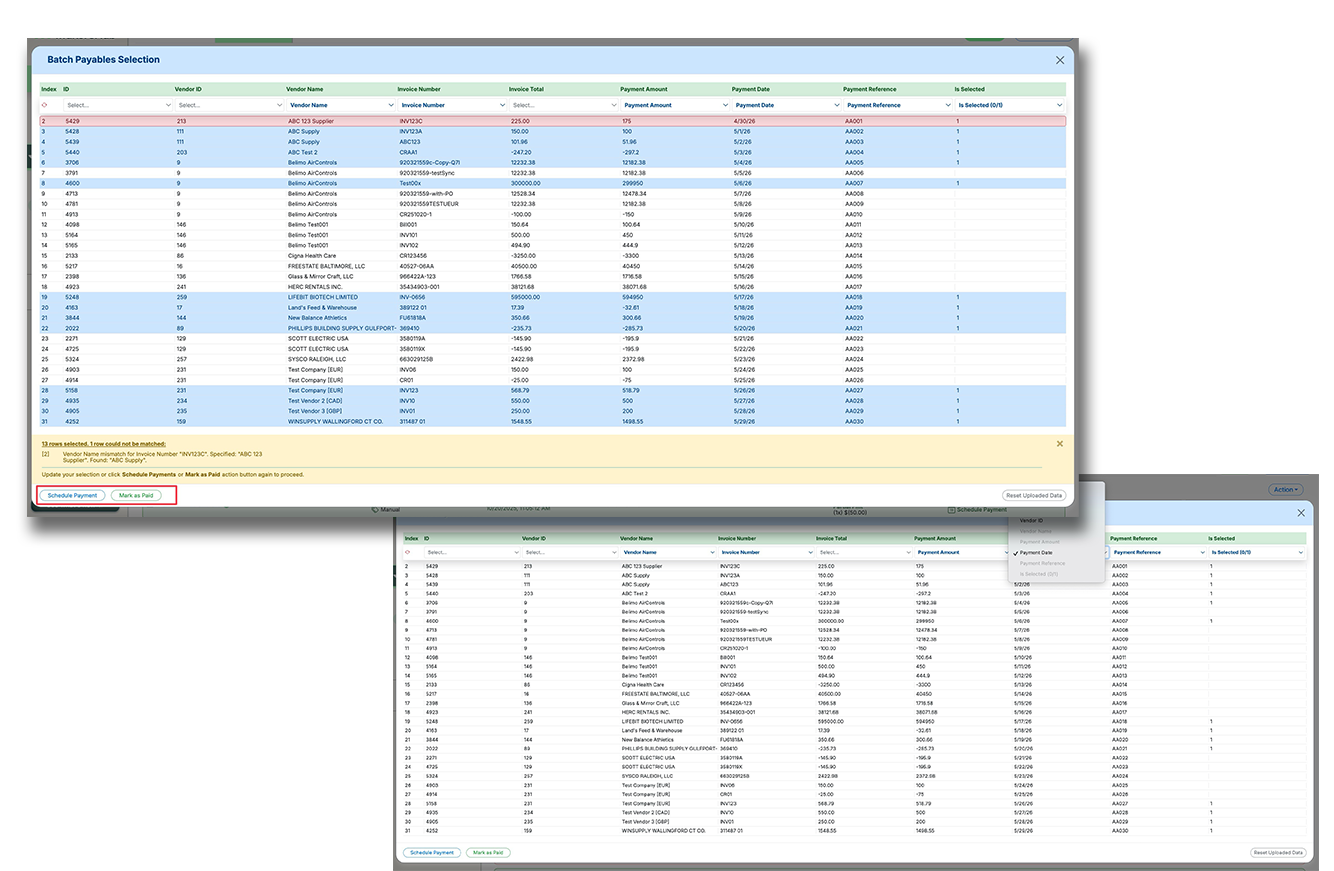
Batch Payables Selection makes it easier to pay or mark large groups of payables using a spreadsheet upload instead of manual clicking and editing. This helps high-volume accounts payable teams move faster, reduce errors, and handle more complex payment logic in fewer steps.
Upload a spreadsheet to batch select payables based on custom business logic, instead of selecting items one by one.
Map spreadsheet columns to fields like invoice details, vendor details, payment amount, payment date, reference number, and selection status.
Reconcile uploaded rows against outstanding payables, flag mismatches, and complete scheduling or mark-as-paid actions in one flow.
Recent Releases
19-Feb-26
Net Term Discount Support in Mark As Paid
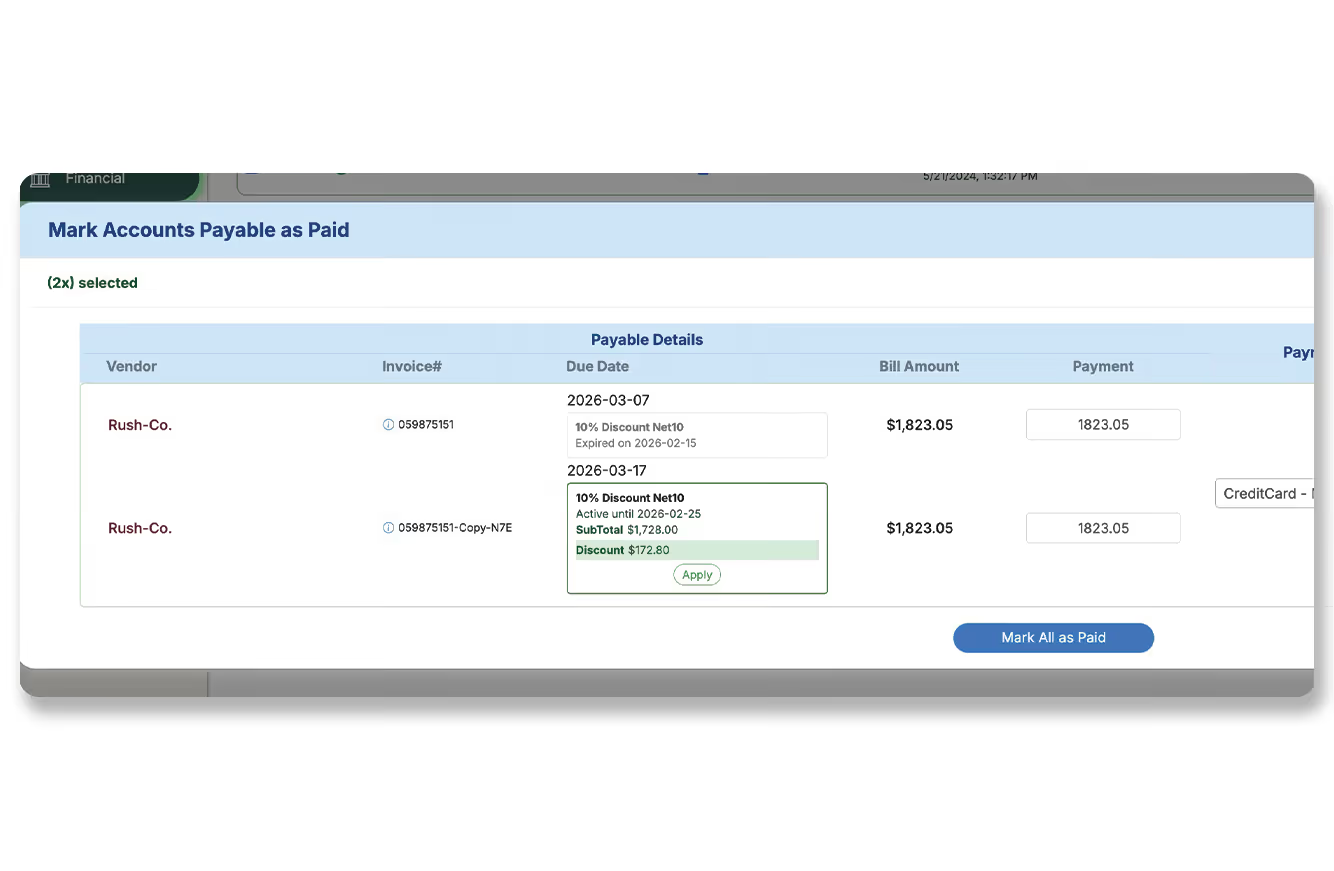
We’ve extended Net Term discount automation to the “Mark As Paid” workflow. When users record payments made outside of MakersHub (e.g., vendor auto-debits), the system now evaluates invoice date, payment date, and net terms to determine discount eligibility and allows users to apply it automatically.
Net term discount logic now available in the Mark As Paid window
Automatically evaluates eligibility based on invoice and payment dates
Ensures accurate reconciliation for off-platform payments
19-Feb-26
REST API & Webhook Infrastructure Expansion
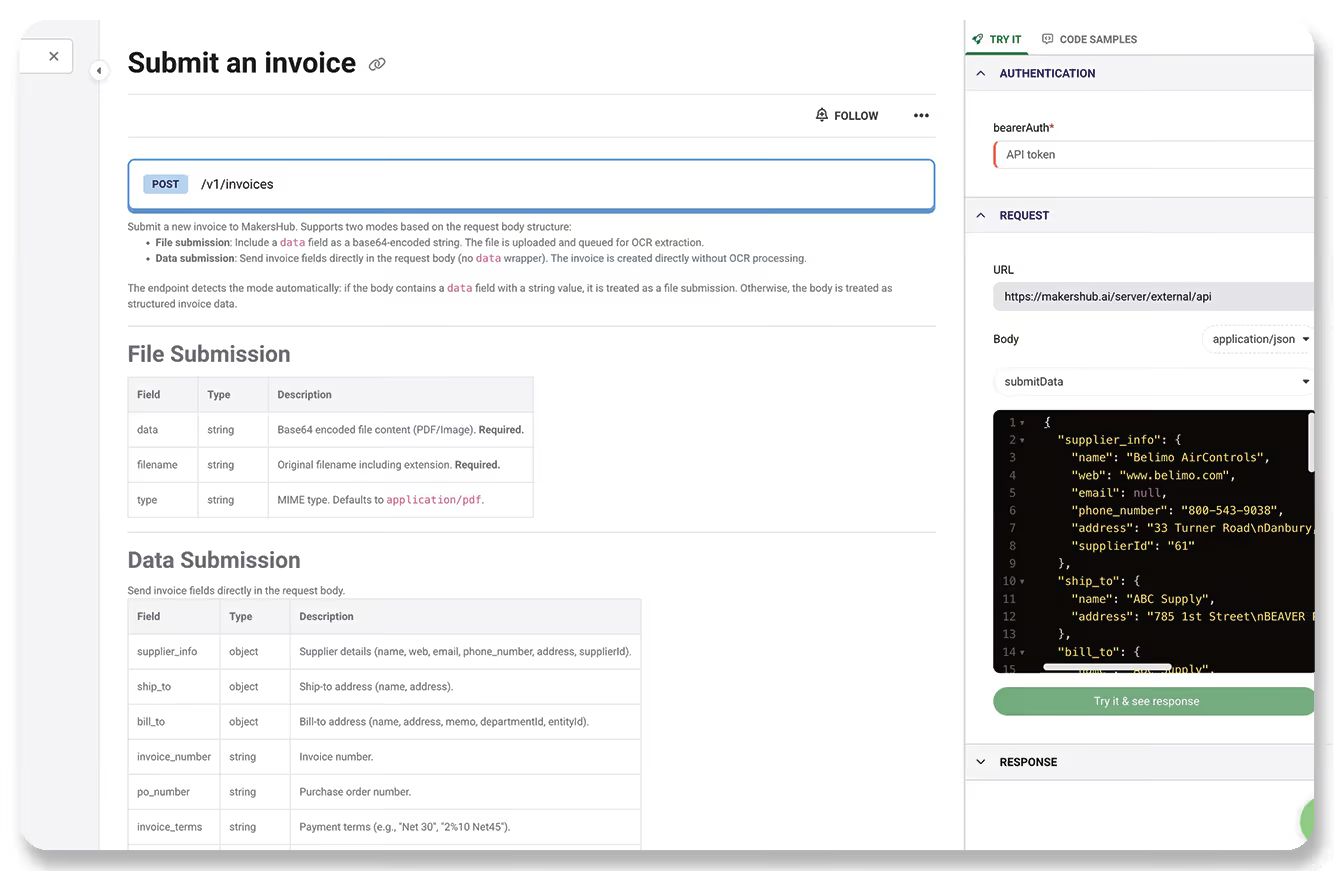
We’ve significantly expanded our REST API and webhook capabilities to support enterprise integrations. The handler architecture has been upgraded to a more robust framework with authentication middleware, enabling faster and more secure expansion. Comprehensive API documentation is now available at support.makershub.ai/apidocs.
Expanded REST API endpoints and webhook notification capabilities
Upgraded handler architecture with authentication middleware
Enables stronger enterprise integrations and faster future expansion
19-Feb-26
Integration Mapping Cross-Entity Import Upgrade
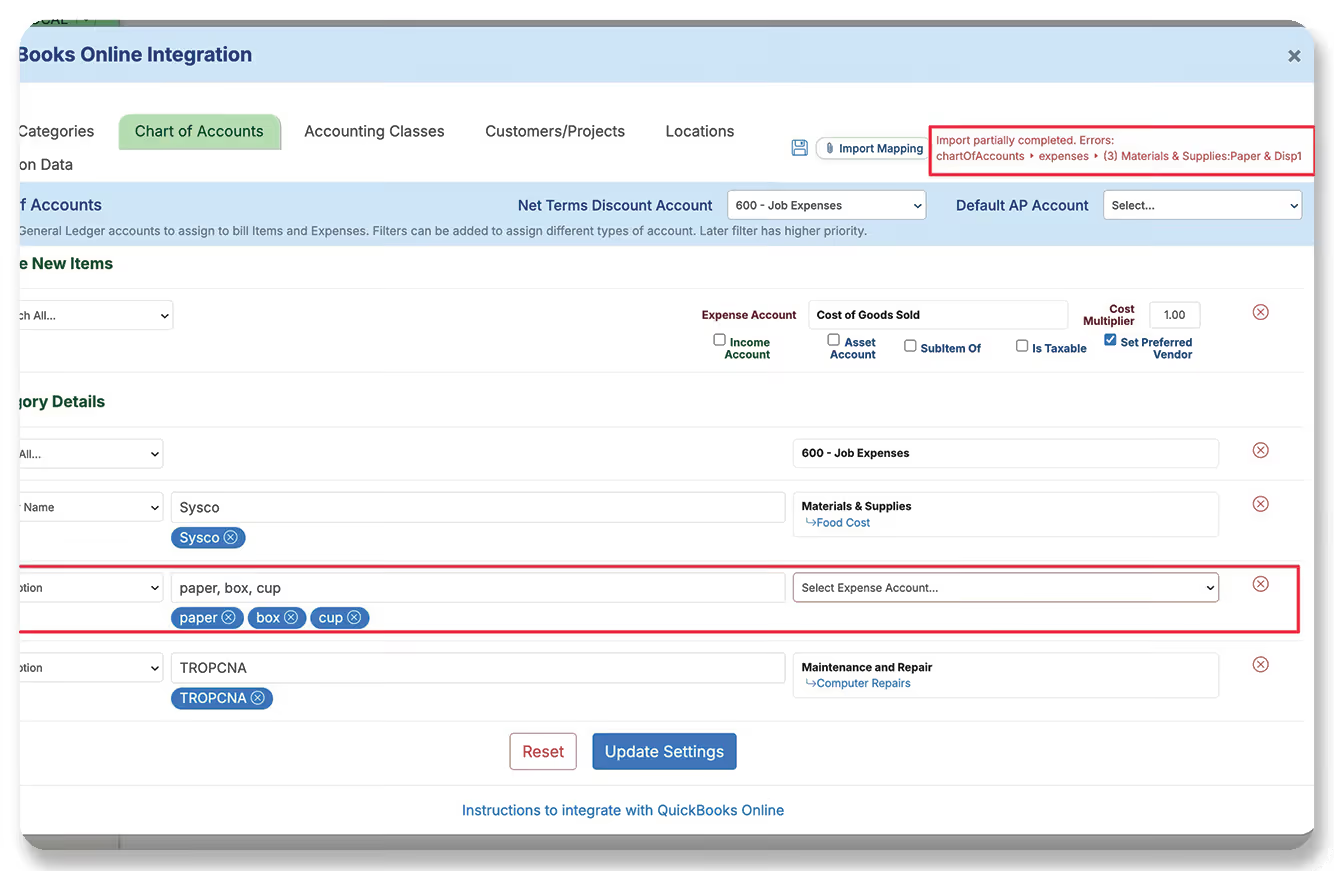
We’ve upgraded Integration Mapping export/import to better support CPAs and multi-entity businesses. Exported mappings now include both ledger IDs and full account names. When importing into another entity, the system matches accounts by name and auto-maps the correct IDs. Any mismatches are highlighted for review, dramatically reducing manual reassignment.
Exported mappings now include both ledger IDs and account full names
System auto-maps GL accounts by name during cross-entity import
Discrepancies are clearly flagged to minimize manual work
12-Feb-26
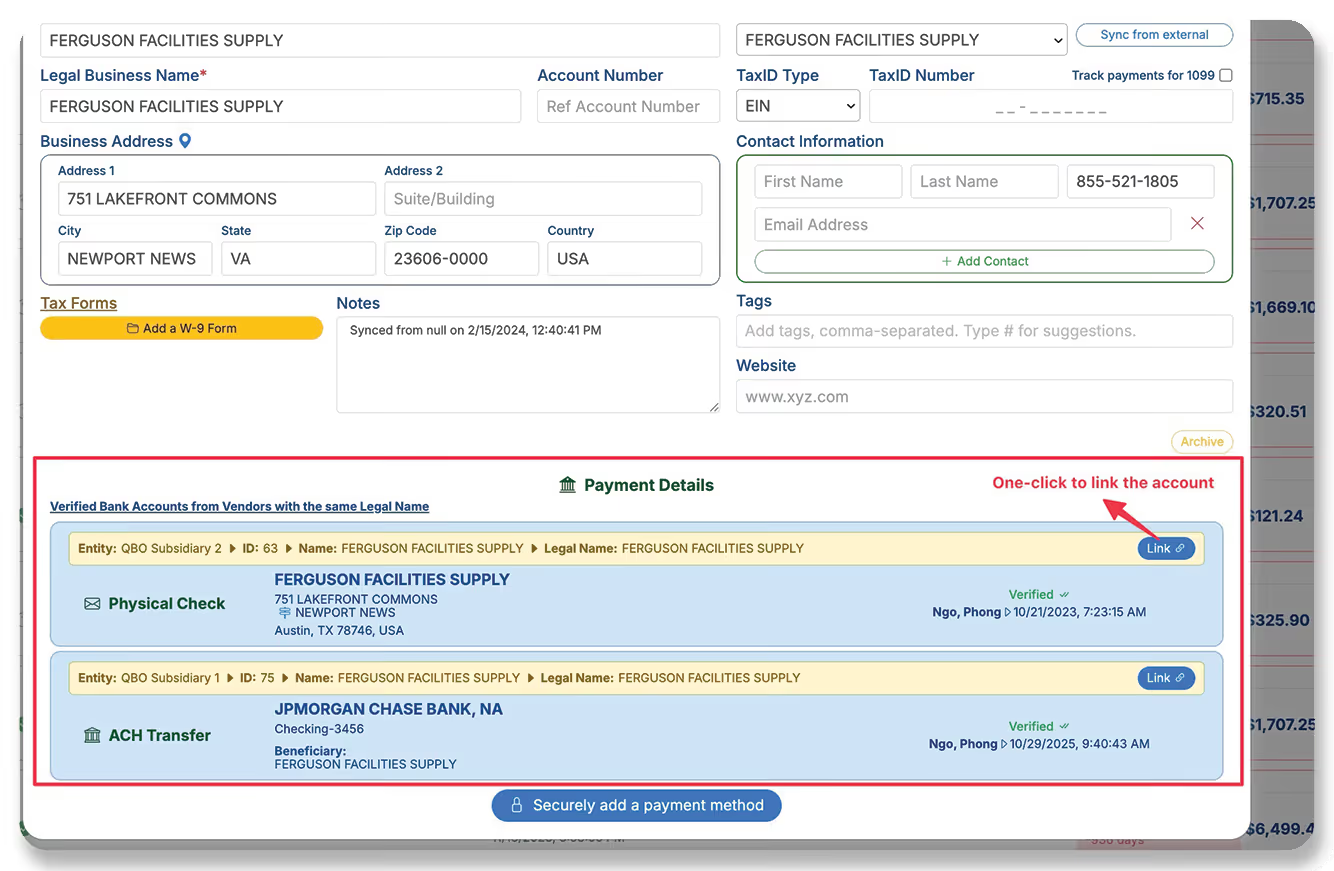
Cross-Entity Vendor Bank Account Reuse
We’ve improved payment management for multi-entity organizations where vendors share the same legal name across multiple accounting instances. Instead of manually re-entering bank details for each entity, MakersHub now scans for verified bank accounts across linked entities and allows users to link them with a single click.
Detects verified bank accounts for vendors with matching legal names across entities
Enables one-click linking of vendor payment details
Eliminates repetitive manual setup for multi-entity environments
11-Feb-26
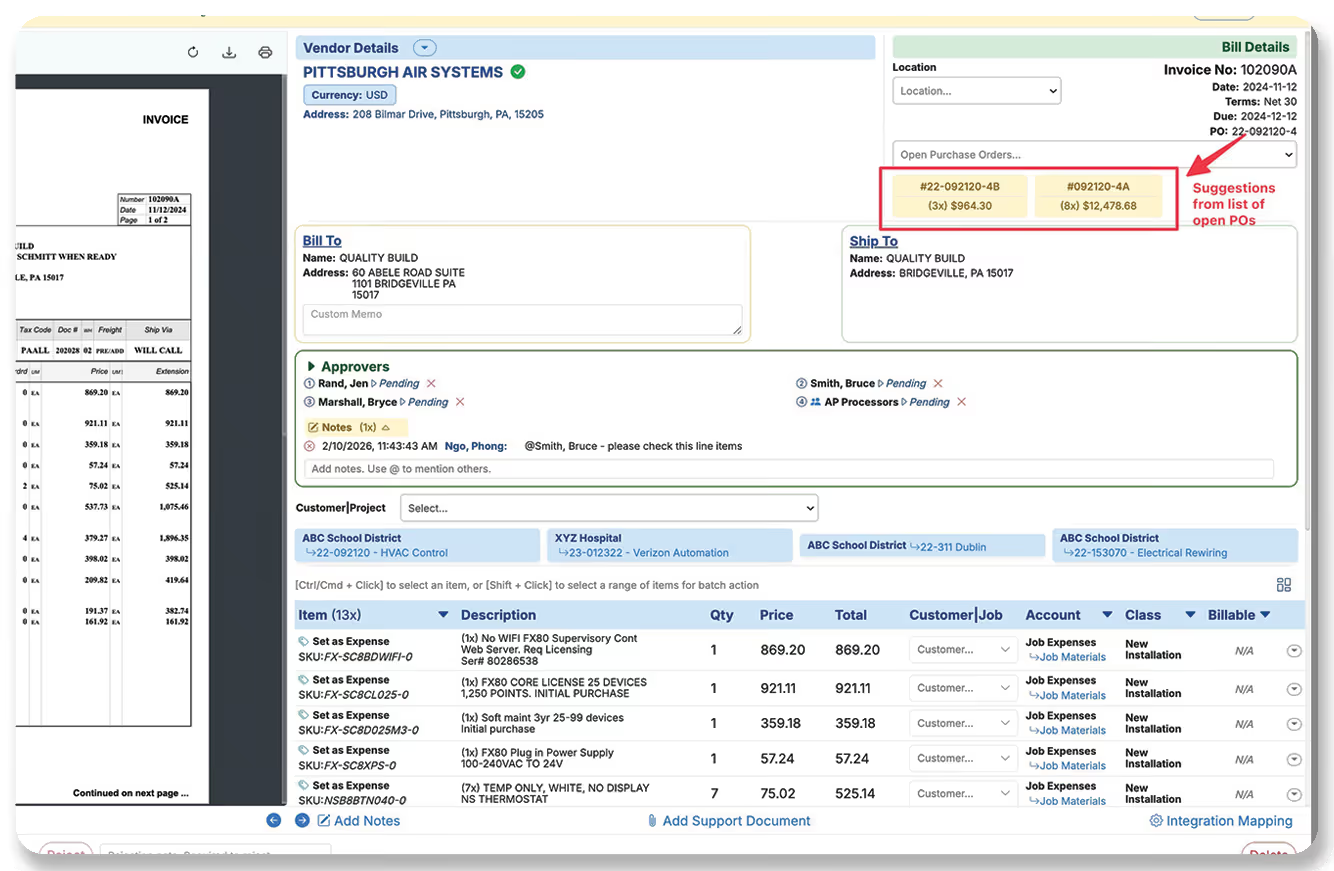
Auto-Suggested Purchase Order Matching
We’ve enhanced our PO-driven workflow with intelligent auto-suggestions. When reviewing a bill, MakersHub automatically scans all open Purchase Orders and suggests the most likely matches based on the PO number extracted from the invoice. Users can instantly review suggested matches without scrolling through long dropdown lists — saving meaningful time for teams managing large volumes of open POs.
Automatically scans open POs and suggests best matches based on extracted PO number
Reduces time spent navigating long PO dropdown lists
Improves efficiency for high-volume PO-driven workflows
7-Feb-26
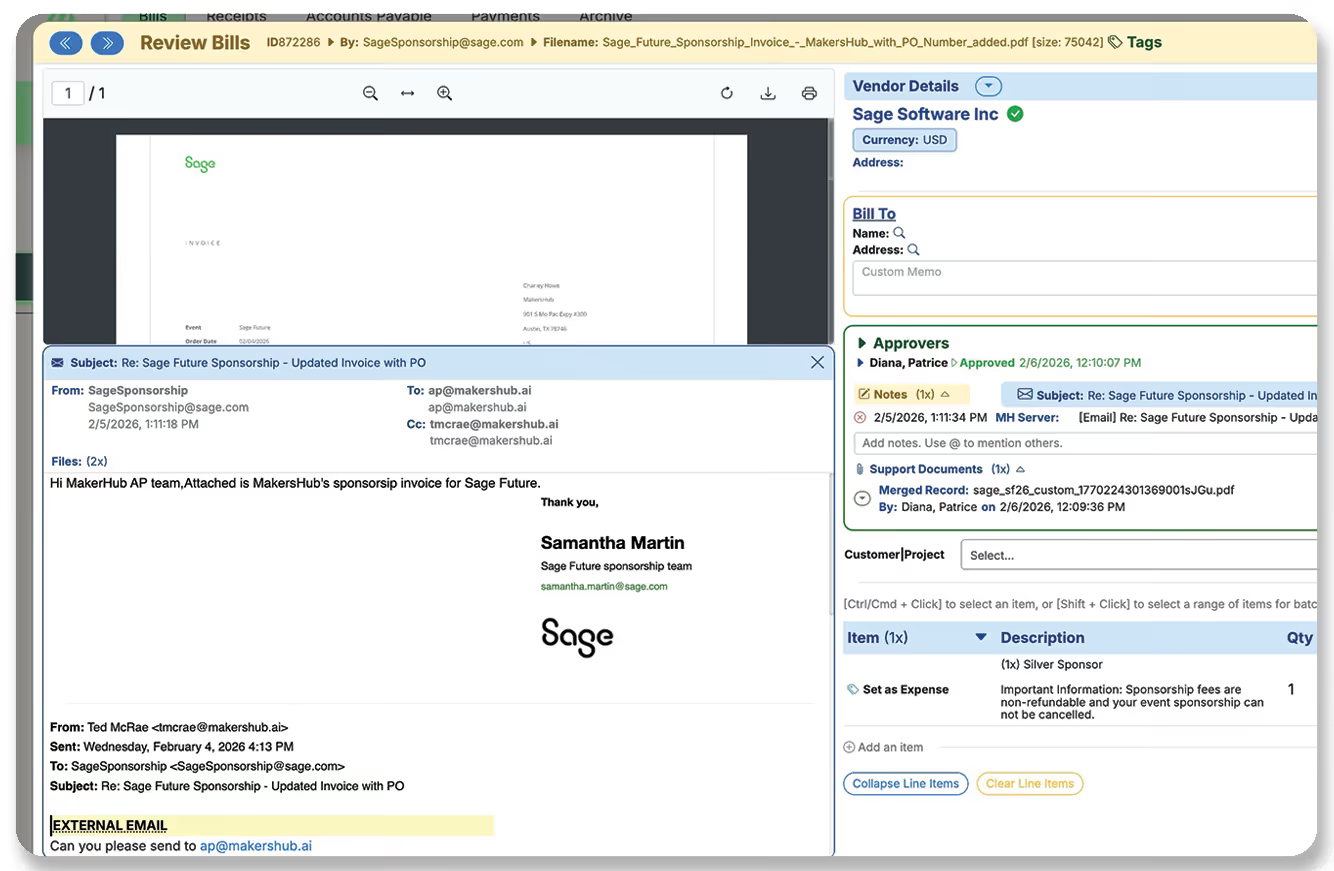
Full Origin Email Visibility on Invoice Review
We’ve enhanced invoice review by linking the full originating email directly to each bill. Previously, users could only see the email subject line. Now, users can view the complete email — including sender, recipients, and message body — directly from the invoice. This eliminates the need to search inboxes for context and strengthens fraud prevention by exposing the true sender email address (not just the display name). The feature is fully backward compatible and applies to historical invoices as well.
Invoices now link to the full originating email, not just the subject line
Improves fraud prevention by exposing the true sender address and recipients
Fully backward compatible and available on previously received invoices
29-Jan-26
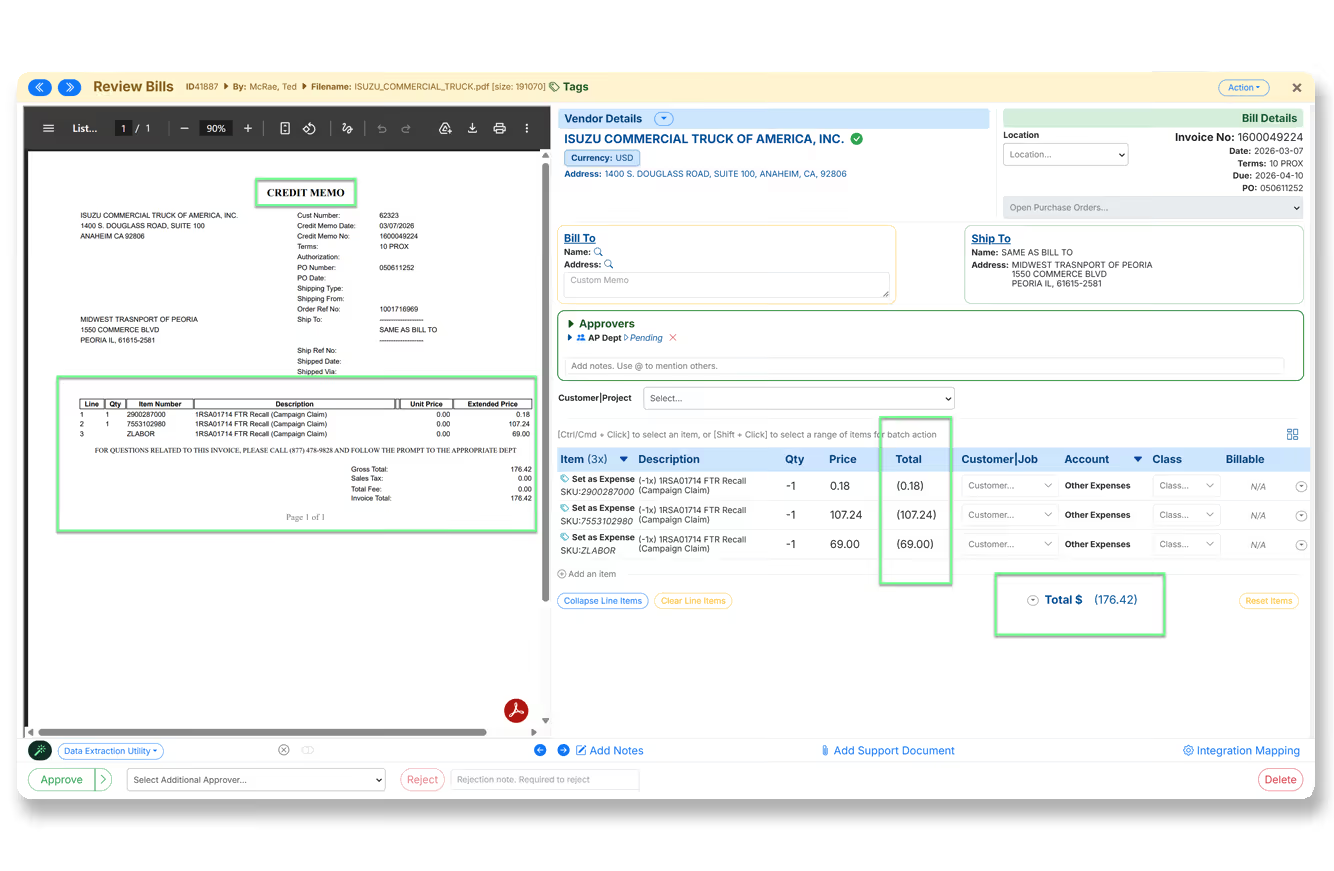
Vendor Credit Detection Improvements
The system now better detects credit memos that appear as positive invoices. This prevents approving credits as bills. Accounting accuracy is improved.
Detect header-based credits
Handle mixed documents
Fewer corrections
27-Jan-26
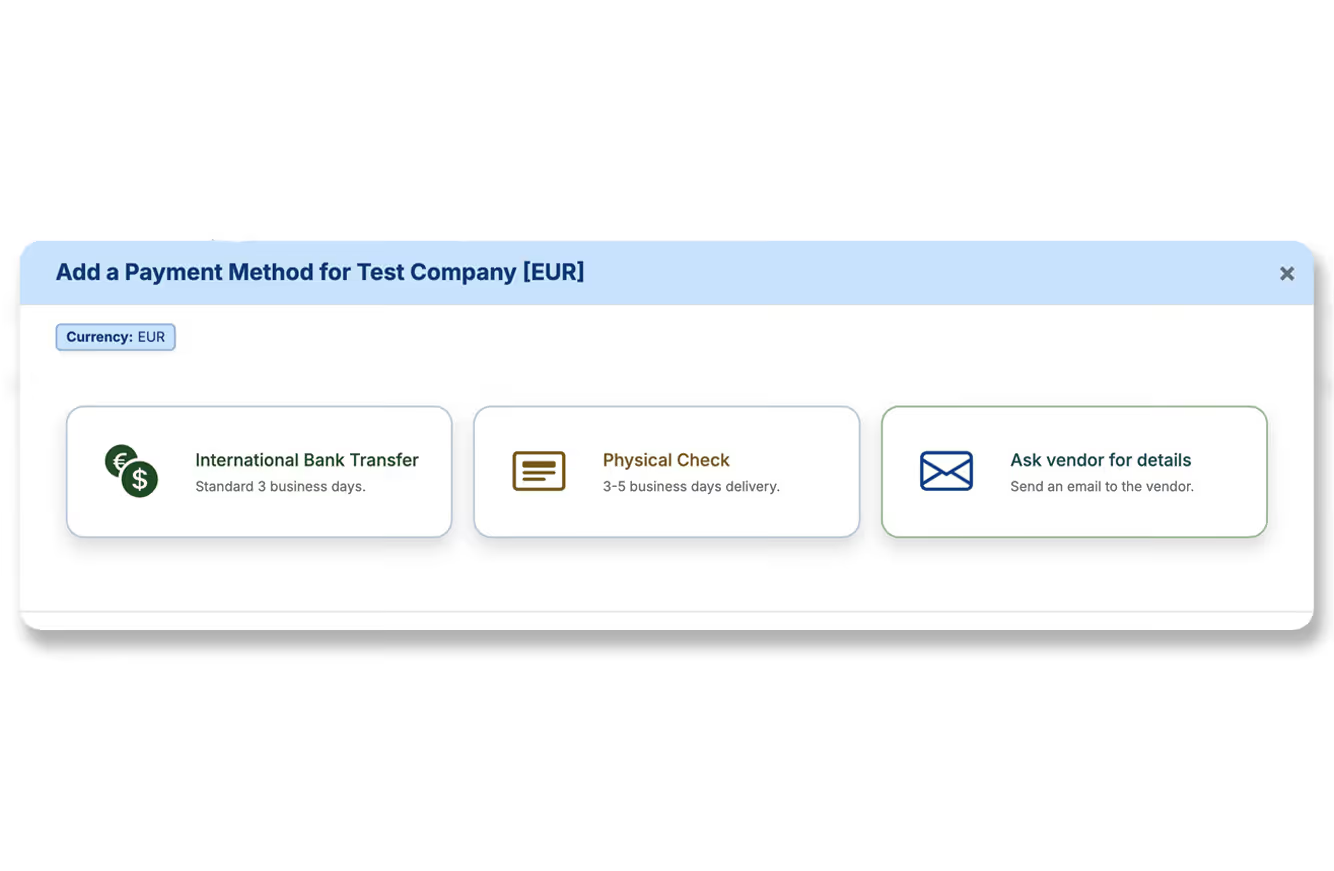
International Payments Expansion
International payments now support SWIFT and intermediary banks. This enables complex global transfers. Users can configure full payment instructions.
SWIFT support
Intermediary banks
Global coverage
4-Jan-26
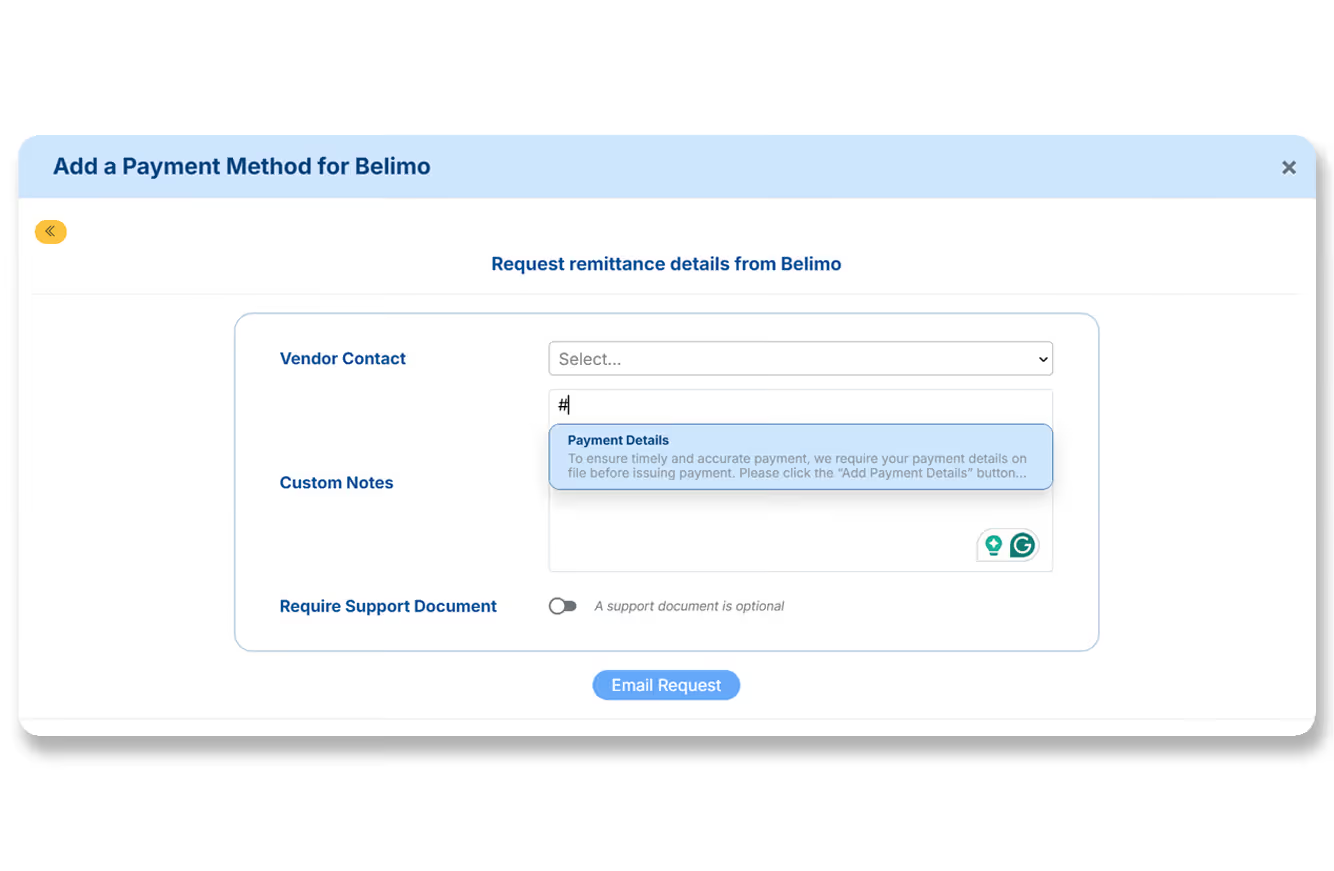
Vendor Tags & Reusable Communication Templates
Expanding on our previous invoice tagging update, we’ve added tagging and communication template support directly into the Vendor dashboard – a simple yet powerful set of tools to organize vendors and streamline outreach. 🔖 Vendor Tagging: Users can now add/insert tags on vendor records using # (just like invoice tags) – with auto-indexing across the entity. Admins/Accounting Access can create or delete tags; Standard users can reference/apply existing tags, ensuring consistency. Great for categorizing vendors (e.g., #Subcontractor, #MissingW9, #ACHOnly) and improving search/filter performance. 📩 Reusable Communication Templates: Admin/Accounting users can now manage reusable email templates (“snippets”) under Manage Communication Templates on the Vendor dashboard. These templates can be used when requesting Payment Details or W-9s. Compose free-text emails and use # to insert templates into the body easily; configure multiple templates by vendor type, relationship stage, or tone. This brings structure and speed to common vendor communication workflows – perfect for teams managing many vendors or needing consistent messaging.
Vendor records now support hashtags for tagging – improving search, organization, and visibility
Admins and Accounting Access users can manage reusable email templates for vendor requests (e.g., W-9s, ACH details)
Templates can be inserted inline via #, supporting faster and more consistent communication
16-Dec-25
Smarter Tag Management with Auto-Indexing & Access Controls
We’ve released a major quality-of-life improvement to how users manage and apply tags across bills, receipts, and vendors – turning what was previously a free-text field into a structured, discoverable, governed system. Tags are a powerful way to categorize docs beyond what’s in the accounting system (e.g., marking bills “awaiting PO,” “for subcontractors,” or “review ASAP”). But freeform tags led to duplicates, inconsistent formatting, and no easy way to see existing tags. This update changes all that. 🔖 Tag Auto-Indexing & Hashtag Selector: Tags are now auto-indexed company-wide; users can type # to see a dropdown of existing tags – preventing inconsistent or duplicate tags (e.g., Subcontractors vs subContractors) and improving tagging speed/consistency. 🔐 Role-Based Tag Permissions: Admins and Accounting Access users can create new tags or delete outdated/mistyped tags, while Standard users can only apply existing tags – maintaining clean tag hygiene. (Coming next based on this framework: vendor tags with the same auto-indexing, tag color labels for grouping, save/recall payment request templates by tag, save/recall W-9 request templates.)
Users can now use # to reference and apply company-wide tags with autocomplete
Admins and Accounting users can create/delete tags; Standard users can only apply existing tags
Lays the foundation for vendor tags, color-coded labels, and template-based workflows