
Resources
Product Updates
Stay up to date with the latest improvements to MakersHub. Here you’ll find new feature announcements, performance enhancements, and quality-of-life updates - all designed to help you work smarter.

Feature Release
April 23, 2026
Batch Payables Selection
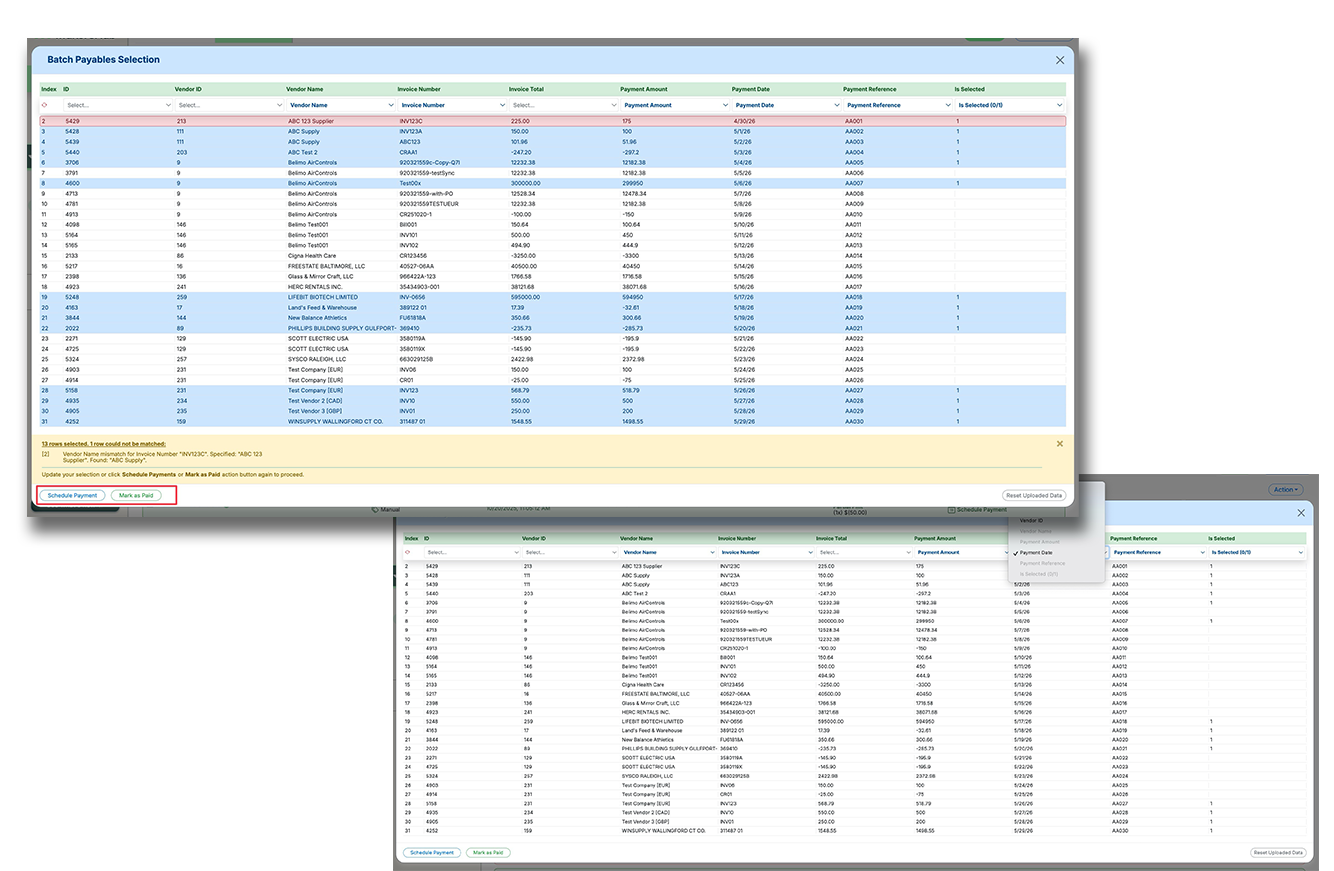
Batch Payables Selection makes it easier to pay or mark large groups of payables using a spreadsheet upload instead of manual clicking and editing. This helps high-volume accounts payable teams move faster, reduce errors, and handle more complex payment logic in fewer steps.
Upload a spreadsheet to batch select payables based on custom business logic, instead of selecting items one by one.
Map spreadsheet columns to fields like invoice details, vendor details, payment amount, payment date, reference number, and selection status.
Reconcile uploaded rows against outstanding payables, flag mismatches, and complete scheduling or mark-as-paid actions in one flow.
Recent Releases

15-Dec-25
Customizable Invoice Table Columns
Users can choose which columns appear in the invoice table and adjust widths. Layouts can be saved per user or company. This reduces clutter and scrolling.
Select visible columns
Adjust column widths
Per-user layouts
8-Dec-25
Enhanced Custom Filters: Entity & Sync Status Support
We’ve rolled out additional improvements to Custom Filters, making them smarter and more context-aware – especially for multi-entity environments. Key updates include: Entity-Aware Filtering – MakersHub now detects if your account supports multiple entities and dynamically enables filtering by Entity when constructing custom filters; Payment Sync Status Filter – users can now filter payment records by sync status (e.g. synced, failed, pending) for easier troubleshooting and reconciliation. (Heads-up: filtering by Accounts and Classes is temporarily disabled on multi-entity instances, because those filters rely on internal IDs which vary by entity even if names are same. We’re working on a fix to allow name-based filtering, and will re-enable these once ready.)
Custom Filters now support filtering by Entity for multi-entity environments
New option to filter Payments by sync status for better visibility and debugging
Account/Class filters temporarily disabled on multi-entity setups; will return with name-based filtering soon
7-Dec-25
“Changes Requested” Rejection Option for Approval Workflow
We’ve added a powerful improvement to the approval workflow – the ability to reject a bill with “Changes Requested” instead of fully archiving it. This was built for a specific customer’s workflow and benefits all teams with multi-approver flows. Previously, if an approver rejected a bill, it was marked rejected and moved to Archive, even if they just needed a correction/clarification – making resetting the approval process frustrating and error-prone. Now, if an approver selects “Changes Requested” when rejecting: (a) the system notifies all previous approvers that a bill they approved was sent back, (b) their approval timestamps are cleared (resetting the workflow), (c) the bill remains active (not archived), and (d) the final approver’s rejection timestamp is maintained until changes are made. Once updates are completed, the approver can un-reject and approve to resume the process – enabling collaborative back-and-forth without derailing the entire bill.
New “Changes Requested” option in rejection notes resets approval flow without archiving the bill
Previous approvers are notified and their approvals cleared, allowing for re-approval after updates
Rejector’s timestamp is preserved until the issue is resolved and the workflow continues
7-Dec-25
Support for Standard PDF Attachments in Check Mailing
We’ve updated our check mailing system to support standard PDF attachments, including multi-page documents – making it easier to include contracts, statements, or other backup materials with mailed checks. Previously, due to bank API restrictions, we were limited to image-based attachments only, and PDFs required tight formatting to avoid errors. With our new check processor, we can relax those limitations and support a much wider range of document types and formats. Whether it’s one page or ten, users can now attach full-length PDF documents to outgoing checks confidently.
Now supports standard, multi-page PDF attachments with check payments
Eliminates the need to convert attachments to images to meet formatting restrictions
Enabled by the new check processor – providing more flexibility and fewer formatting headaches
7-Dec-25
Tax Code Support for QuickBooks Desktop Canada
We now fully support Tax Code assignment and reconciliation for QuickBooks Desktop (QBD) Canada – a key milestone in expanding our Canadian AP capabilities. This release includes significant improvements to how we calculate, allocate, and reconcile tax amounts at the line-item level, required for accurate Canadian sales tax (e.g., GST, PST, HST). We implemented detailed penny-math logic to match vendor totals – something QBD doesn’t handle well natively, especially when tax is included in line totals. QBD requires a specific setting to support tax-inclusive line items – and when that isn’t enabled (as with Foster Air), entering those bills is cumbersome. MakersHub now automatically detects and reconciles tax-inclusive values, streamlining bill entry even when QBD lacks native support. (We’re testing edge cases and GL reconciliation with Foster, but this update is production-ready for Canadian QBD users.)
Supports full Tax Code mapping for QuickBooks Desktop Canada with line-level accuracy
Auto-reconciles tax-inclusive line items, even when QBD doesn’t natively support this format
Enhances GL alignment and tax breakdowns, improving reconciliation workflows for Canadian vendors
7-Dec-25
One-Click Tax Reconciliation (Canada)
Users can resolve tax discrepancies with a single click. MakersHub auto-creates adjustment lines to balance totals. This removes manual correction steps.
One-click reconciliation
Auto adjustment lines
Reduce manual work
7-Dec-25
Line-Level Tax Calculation and Reconciliation
Taxes are now calculated and reconciled at the individual line-item level. This ensures precise math when multiple tax rates apply. It improves balance sheet accuracy.
Line-level tax math
Supports multiple rates
Accurate totals
7-Dec-25
Line-Level Tax Calculation Support for Canadian Vendors
As we deepened support for Canadian sales tax, we uncovered a critical detail: tax must be calculated at the line-item level, not on the subtotal. This leads to small but important rounding differences that can throw off reconciliation if not handled correctly. For example, tax codes like GST + PST are applied per line item, and each line rounds to two decimals before summing. This is why some invoices (e.g. Foster Heating & Cooling) appear to have penny discrepancies when using standard subtotal math. With this update, MakersHub now (1) calculates/applies sales tax per line item (respecting how real invoices are structured), (2) breaks out each tax code and rate used on a line (matching what’s shown on the vendor’s invoice), and (3) improves matching logic consistency with Canadian formats – laying the foundation for automated tax reconciliation next.
Sales tax is now calculated and applied at the line-item level, avoiding rounding discrepancies and mismatches
System now tracks and breaks out tax codes and rates used on each line item for full visibility
Supports more accurate reconciliation for Canadian vendors and paves the way for future auto-matching of tax totals
4-Dec-25
Smart Bookmark Navigation for Grouped Invoices (PDF Viewer Upgrade)
Building on our recent custom PDF viewer release, we’ve shipped a powerful new feature that improves navigation within grouped invoice PDFs – one of MakersHub’s differentiators. Grouped invoices (like Home Depot batches) are kept intact (untampered), which is key to preserving original documents. But this also means users often scroll far away from the targeted invoice page and lose track of their place. With this update, the PDF viewer now (a) detects and flags bookmarked pages (pages linked to a specific invoice in the group), (b) highlights the current bookmark position, and (c) allows users to instantly jump back to the correct page with one click – no matter where they’ve scrolled. This makes navigating large PDFs easier, faster, and less error-prone – especially when handling batches of 20–50+ invoices. (📌 Note: currently in opt-in beta for the viewer; once testing is done, it will become default.)
PDF viewer now flags and highlights bookmarked invoice pages inside grouped documents
Users can instantly return to the correct invoice page with one click – no more manual scrolling
Feature is live in the opt-in beta PDF viewer, paving the way for future smart navigation capabilities
4-Dec-25
Invoice Bookmark Navigation
The PDF viewer now highlights bookmarked invoice pages. Users can return to the correct page with one click. This reduces confusion in large invoice groups.
Bookmark detection
One-click return
Less scrolling confusion