
Resources
Product Updates
Stay up to date with the latest improvements to MakersHub. Here you’ll find new feature announcements, performance enhancements, and quality-of-life updates - all designed to help you work smarter.

Feature Release
April 23, 2026
Batch Payables Selection
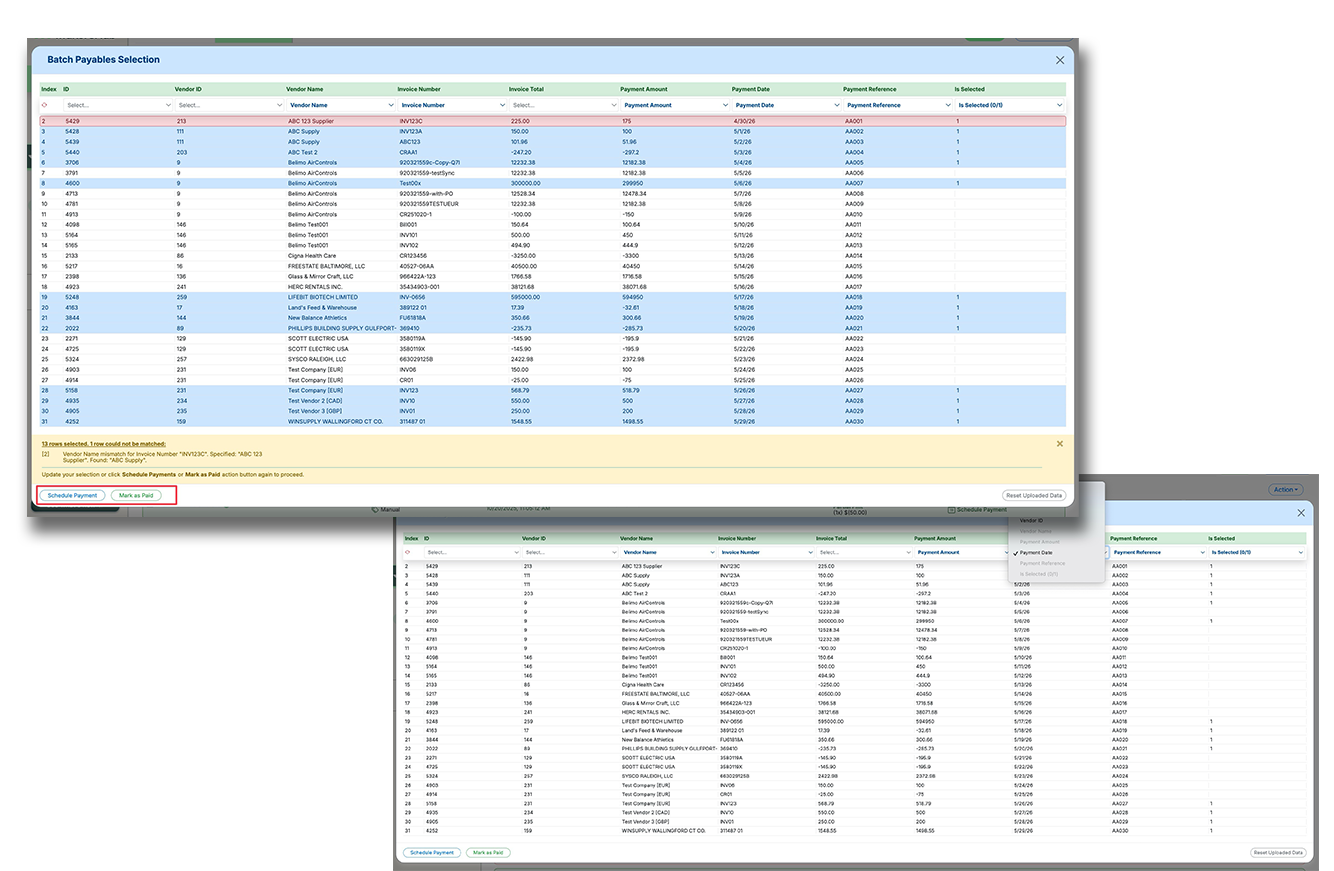
Batch Payables Selection makes it easier to pay or mark large groups of payables using a spreadsheet upload instead of manual clicking and editing. This helps high-volume accounts payable teams move faster, reduce errors, and handle more complex payment logic in fewer steps.
Upload a spreadsheet to batch select payables based on custom business logic, instead of selecting items one by one.
Map spreadsheet columns to fields like invoice details, vendor details, payment amount, payment date, reference number, and selection status.
Reconcile uploaded rows against outstanding payables, flag mismatches, and complete scheduling or mark-as-paid actions in one flow.
Recent Releases
4-Dec-25
Improved Date Input + Cross-Browser Compatible PDF Viewer
Two important quality-of-life improvements are now live, smoothing out everyday friction and laying the foundation for future “power features”: (1) Consistent & Controlled Date Input for Invoice/Due Date fields, and (2) a cross-browser compatible PDF viewer (first rollout). Previously, clicking into those date fields triggered the native browser date picker – which auto-switched format to MM-DD-YYYY even though we display dates as YYYY-MM-DD. This often caused confusion and incorrect entries when users started typing without noticing the format change. We’ve now rolled out a custom date input component that retains consistent YYYY-MM-DD formatting across all interactions – a small change with big impact (no more second-guessing what format you’re typing!). Meanwhile, our new PDF viewer in “compatible mode” ensures consistent rendering across browsers (Chrome, Firefox, Safari, Edge) – unlocking advanced features we couldn’t build before. (Future possibilities include: locking scroll to specific invoice pages in grouped PDFs, one-click jump back after scrolling, and teaching the system to extract text by drawing a box.) For now, the viewer is opt-in so we can iterate safely.
Custom date input ensures consistent YYYY-MM-DD format when editing Invoice and Due Dates
New cross-browser compatible PDF viewer delivers reliable rendering and paves the way for smart document interactions
Future roadmap includes scroll-locking, page targeting, and point-and-train data extraction via text box drawing
4-Dec-25
Bookmark Highlighting in Multi-Invoice PDFs
We recently launched our custom PDF viewer to give you full control over how invoice documents render in MakersHub. With this latest enhancement, the viewer now detects when a PDF has a bookmarked page (e.g., within a multi-invoice bundle) and highlights it for quick access.
If you scroll away — no matter how far — a single click takes you right back to the correct invoice page. No manual hunting. No getting lost in a 50-page scan.
This feature is available today in Beta mode inside the new PDF viewer. Users can opt in and turn it on anytime. You will be notified once it becomes the default experience.
2-Dec-25
Support for Canadian Businesses
MakersHub can now serve businesses in Canada! This includes:
Fully supporting Canadian sales tax structures for QuickBooks Online customers, including provinces that use multiple tax components on a single line.
Calculating and displaying sales tax at the line-item level, applying the correct tax code and rate to each individual item. Each line is rounded before totals are summed — exactly how vendors calculate their invoices.
Upgrading our line-item extraction engine to better interpret numeric values in a wider range of invoice formats. Spaces within numbers are now handled correctly, and negative values are detected even when the minus sign appears at the end
1-Dec-25
Granular Canadian Tax Reconciliation & One-Click Adjustments
We’ve significantly expanded our support for Canadian sales tax workflows – introducing deeper accuracy, greater transparency, and full line-item level reconciliation automation. 🧮 Rate-Level Tax Indexing & Calculation: Tax is now calculated based on the exact tax rate(s) applied per line item, indexed and displayed independently for complete visibility into how totals are constructed. ✅ Reconciliation Between Extracted vs Calculated Tax: When extracted tax values from the document don’t align with what’s calculated from applied codes, the system now holds and matches those lines for comparison – discrepancies are clearly surfaced for resolution. ⚡ One-Click Tax Reconciliation: Users can now reconcile tax differences in one click – the system will back-calculate the correct net amount based on the tax rate, insert a taxable adjustment line, and add a non-taxable offset to preserve the total – all automatically, without manual recalculation. ✏️ Direct Tax Amount Editing: Users can also override the calculated tax amount manually; the platform will generate the necessary adjustment pair to keep totals balanced while preserving accuracy. 🚩 “Tax Lookalike” Detection: If the system detects charges (e.g. environmental fees) that resemble tax but should be categorized separately, these are now flagged for review, with a one-click option to insert the correct line item. 🔄 QuickBooks Sync Accuracy: All line-level tax and adjustment logic is fully compatible with QBD and QBO, ensuring synced bills reflect correct totals – whether syncing as expenses or items, consolidated or not.
Supports detailed rate-level tax calculations and indexing for GST, PST, and HST
One-click reconciliation automatically adjusts line items and offsets to resolve tax discrepancies
QuickBooks syncs now reflect exact totals with all tax and adjustment logic applied correctly
1-Dec-25
Improved Numeric Extraction: Euro-Style Formatting & Credit Detection
As invoice volume grows – especially with more international documents – we’ve made two critical improvements to our data extraction engine for numeric values. 1️⃣ Improved Handling of Spaced Digits: European invoices often include spaces within numbers (e.g. “1 000,00”), which previously caused our reader to clip the number – misreading totals or unit prices. This formatting quirk isn’t exclusive to Europe (we’ve seen it in North America too); the reader now properly recognizes and parses these spaced/grouped digits as intended. 2️⃣ Smarter Credit Detection (Trailing Minus Sign): We improved detection for credits that use a trailing minus (e.g. “100-”). This style is increasingly common, and failure to catch it could result in a credit being processed as a bill – creating workflow headaches. These credits are now accurately identified, preventing misclassification and ensuring smoother downstream workflows. (Big shoutout to our engineer for adding thorough test coverage to avoid breaking any existing edge cases!)
Numeric values with internal spaces (e.g. “1 000,00”) are now correctly parsed, addressing common European formatting issues
Improved credit detection for invoices showing trailing minus signs (e.g. “100-”) – reducing the risk of credits being misclassified as bills
Updates were fully test-covered to preserve accuracy across all known invoice formats and edge cases
30-Nov-25
Tax-Inclusive Invoice Detection (Canada)
The system can now detect when taxes are included in line item amounts on Canadian invoices. MakersHub reconciles totals correctly without manual math. This reduces penny discrepancies.
Detect tax-inclusive pricing
Automatic reconciliation
Reduce rounding errors
28-Nov-25
Canadian QBO Tax Code Support (GST/PST Allocation)
We’ve taken a big step forward for our Canadian customers by introducing Tax Code allocation for QuickBooks Online Canada. This update allows the platform to query and apply preconfigured QBO tax codes and associated rates – including complex province-specific combinations like GST + PST. In QBO Canada, a Tax Code can reference multiple tax rates (e.g., a single code might include both federal GST 5% and a provincial PST of 5–10%). MakersHub now supports assigning these composite codes accurately on line items. We also added support for detecting if tax is included in line item totals – a common invoicing practice in Canada. The data reader now handles this intelligently and will auto-code it via Integration Mapping, enabling faster and more accurate reconciliation. (This update is now live and ready for onboarding customers like Foster Heating & Cooling.)
Supports QBO Canada’s composite Tax Codes (e.g., GST + PST) and province-specific tax configurations
Detects and reconciles inclusive tax amounts directly from Canadian invoices
Integration Mapping enables auto-assignment of tax codes on line items – streamlining AP for Canadian teams
26-Nov-25
Customizable Invoice Table Layout (First Iteration)
We’ve released the first iteration of invoice table customization – a meaningful UI/UX upgrade giving users more control over how invoice line items are displayed. Previously, the invoice table had a fixed layout with locked columns and widths, often showing too much irrelevant data or forcing dreaded horizontal scrolling to find needed info – an issue that grew with complex integrations and edge-case fields. With this update, users can now select which columns to show/hide, adjust column widths via simple percentages (normalized behind the scenes), and even save layouts per user/company – allowing accountants and bookkeepers to tailor the view for each client. (This lays the groundwork for future enhancements like column reordering, renaming, and additional fields such as QBO Canada sales tax.)
Users can now choose which invoice table columns to show and adjust their widths to reduce clutter and improve visibility
Supports user- and company-level layouts, giving CPAs and multi-client users tailored configurations
Foundation for future enhancements including column reordering, renaming, and more advanced field support (e.g. QBO Canada Sales Tax)
26-Nov-25
Custom Payment Filters Now Available
We’ve expanded the filtering capabilities on the Payments tab, allowing users to now create and save custom filters – similar to what’s already available for invoices. Previously, users could only apply one standard filter at a time, limiting how they could view and manage large volumes of payments. With this update, users can build multi-criteria custom filters to target exactly what they need – e.g. all payments that are pending, in transit, or tied to specific vendors or bank accounts, all in one view. This is especially valuable for teams managing high volumes of payments across multiple statuses – enabling quicker follow-ups, better visibility, and more personalized workflows.
Users can now design and save custom filters on the Payments tab using multiple conditions
Works just like the existing Invoice Custom Filter functionality for a familiar and intuitive experience
Ideal for segmenting and tracking payments across different statuses, vendors, or payment methods
25-Nov-25
Infrastructure Upgrade for International & Real-Time Payment Rails
We’ve completed a major upgrade to our payment infrastructure to support international payments, real-time domestic transfers (RTP/FedNow), and wire transfers, alongside existing ACH/check capabilities. While mostly under-the-hood, this lays critical groundwork for a much broader range of U.S. and global payment options. To support these, we restructured the Bank Account data model, overhauled form validations, and improved the vendor onboarding/verification experience – dramatically improving data quality, reducing payment failures, and enabling better control/compliance for AP teams.
Expanded support for new payment rails: international wires (SWIFT), RTP, FedNow, and domestic wires
New transfer type and currency fields across the platform, with updated form validation, EIN/SSN formatting, and Google Maps address suggestions
Improved vendor onboarding: verification re-submissions, required supporting documents, and clearer payment method terminology (“ACH transfer” vs “bank transfer”)