
.svg)
PO Matching, Done at the Line Item
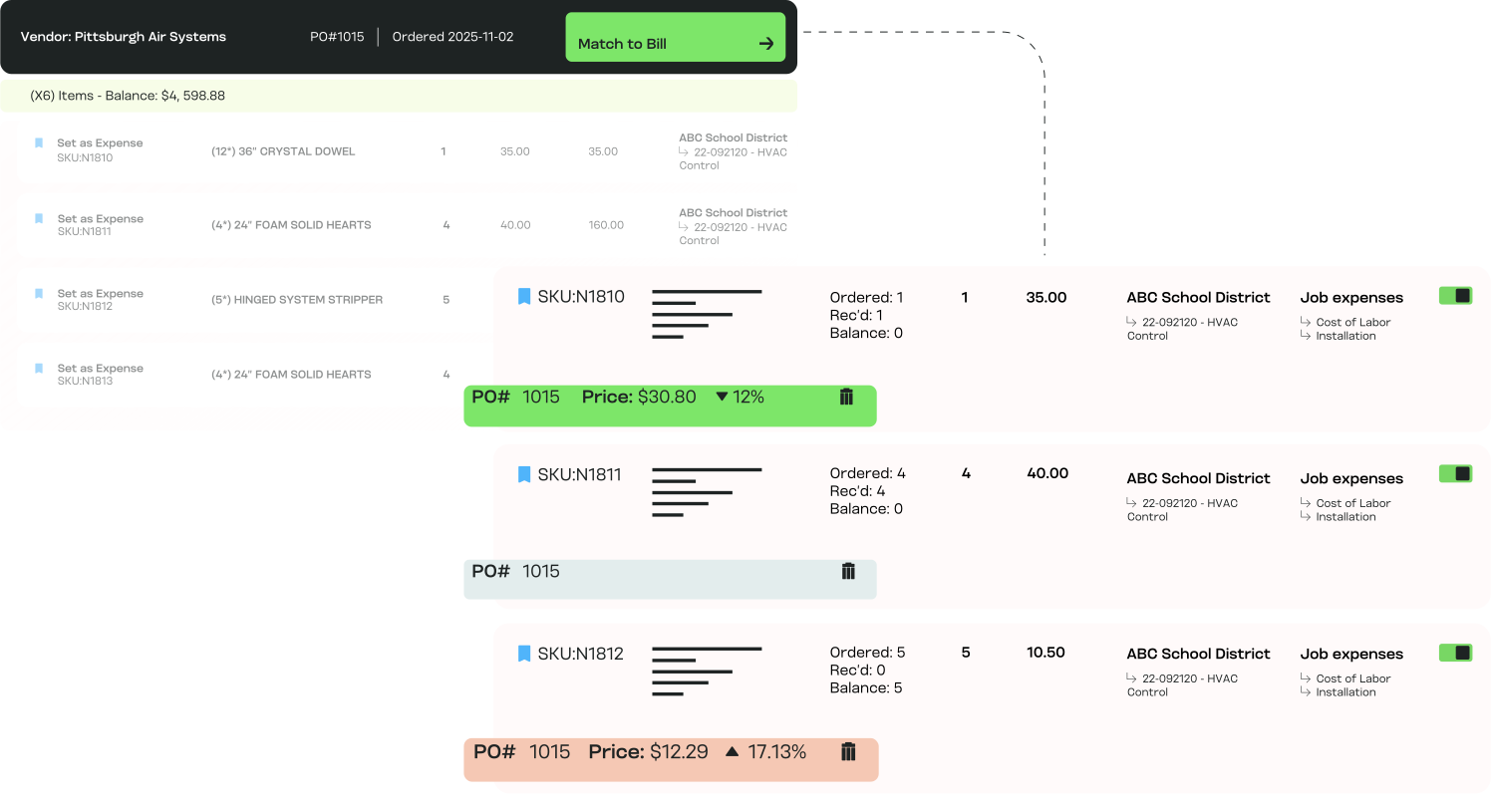
MakersHub compares every bill against its PO and receipt automatically, line by line, and flags the ones that don't reconcile. You review the exceptions, not the matches.
.avif)
High Volume, High-Detail AP
Line-level matching pays off where bills carry many lines, prices move, and a wrong quantity is easy to miss. That means:

Construction finance leads
Supplier and subcontractor bills matched against POs and receipts before a sub is paid.

Manufacturing controllers
Parts and materials matched at the line, so a unit-price change is caught before it erodes margin.

Trades owner-operators
Material bills matched to the PO so the job is not overbilled on a line no one checked.

Accounting and CPA firms
PO matching applied consistently across client books, not just on totals.
How PO Matching Works for You

Stop Overpayments
Duplicate charges, wrong quantities, and inflated unit pricing get caught before payment, not after the check clears.

Line-Item Precision
MakersHub validates quantity, SKU, and unit price on every line, so a bill that adds up still gets caught when a single line is wrong.

Many to Many Matching
Match several bills to one PO, or several POs to one bill. Partial deliveries, split orders, and staged invoicing all reconcile without a workaround.

Built for Complex Operations
Multiple POs, partial receipts, and multi-page bills reconcile without anyone rekeying them into a spreadsheet first.

Confidence in Every Approval
Finance, project managers, and executives approve knowing the bill already matches what was ordered and received.
What Happens Behind the Match

Three-Way Match Made Simple
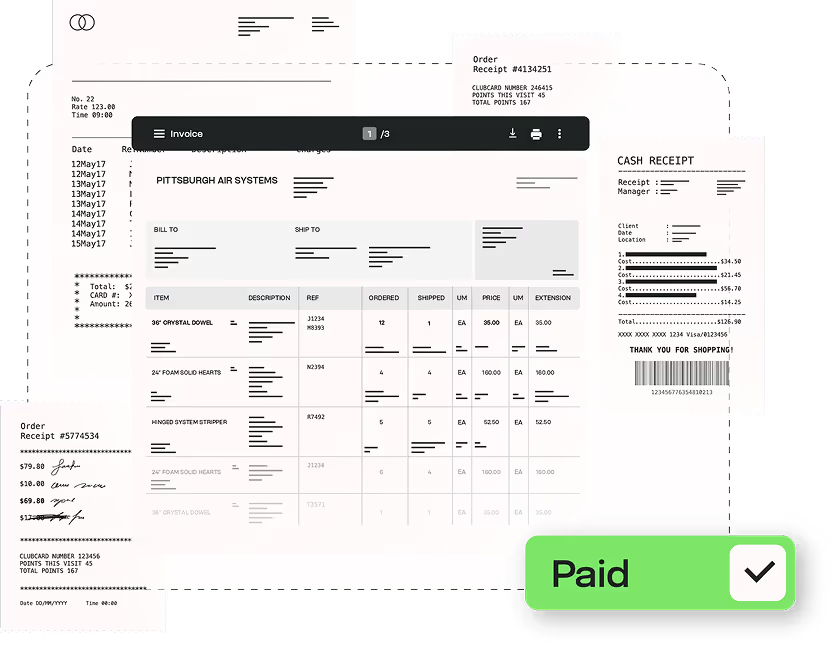
MakersHub compares bill, purchase order, and receipt as the bill arrives and flags any discrepancy on the spot.
.png)
No More Manual Reconciliation
No exported spreadsheets, no line-by-line manual review. Structured line data and your matching rules validate each bill the same way every time.
Protect Margins, Strengthen Vendor Trust
You pay for what was ordered and received. Vendors get paid on time because the bill cleared matching the day it arrived, not three follow-ups later.
Experience the difference firsthand
The Tools That Power PO Matching

Automated PO & Receipt Matching
Validate every bill against its PO and receipt on arrival.

Line-Item Validation
Check SKU, quantity, and unit price on each line, not just the total.

Multi-PO Handling
Reconcile partial shipments against the PO balance.

Discrepancy Flags
Color-coded alerts mark mismatched quantities or pricing.

Searchable Audit Trail
Every match, adjustment, and approval is logged.
In Their Words
“Makershub has revolutionized our operations. The improvements in invoice entry, PO matching, and approval workflows are remarkable, leading to exceptional accuracy and efficiency. This platform has truly elevated our productivity to new heights.”


Jacqueline Finnick, Purchasing Manager
Elite Pools

Match One of Your Bills Live
Book a 20-minute walkthrough, bring a bill with a PO behind it, and we will run the three-way match in front of you.
PO Matching vs the Alternatives
What you need
MakersHub
Manual matching
Header-level tools
Partial receipts
Reconciled against PO balance
Tracked by hand
Often unsupported
Three-way match
Bill, PO, and receipt compared on arrival
Spreadsheets and cross-checking
PO only, often no receipt
Discrepancy handling
Held and flagged before approval
Found after payment, if at all
Total-level only
Match depth
SKU, quantity, unit price per line
Eyeballed line by line
Totals only
Many-to-many
Many bills to one PO, or the reverse
Manual workaround
Usually one-to-one
FAQs
When you upload a bill, MakersHub lets you tie it directly to open Purchase Orders in QuickBooks Online or Desktop. You can select a PO, and the system automatically pulls in line items, quantities received, and pricing. Bills can then be matched line-by-line, added in full, or adjusted manually before approval. Once approved, updates sync back to QuickBooks immediately (Online) or on the next Web Connector run (Desktop).
Yes. MakersHub supports both multiple POs per bill and multiple bills per PO. You can select POs individually and match lines one at a time, making it simple to reconcile complex jobs with multiple orders or partial receipts.
The bill is held and the mismatched lines are flagged before anything moves to approval. You can adjust quantities, accept a partial match against the PO balance, or send it back. Nothing syncs until the discrepancy is resolved.
Absolutely. Quantities can be adjusted manually or auto-filled from the PO balance, ensuring you only pay for what’s been received.
MakersHub highlights mismatches with clear visual cues, using color-coded alerts to show when quantities or pricing don’t line up. This makes issues easy to spot and resolve before approvals.
Once a bill tied to a PO is synced, you can still adjust quantities on existing lines, but new lines from that PO can’t be added to that bill. This ensures clean reconciliation across systems.
Automated PO matching prevents duplicate payments, incorrect quantities, or inflated pricing from slipping through. Every match, adjustment, and approval is logged in an audit trail for full transparency.
Yes. Each line is matched on SKU, quantity, and unit price, so a construction or manufacturing team catches a wrong line even when the total foots. The matched lines carry their job and cost code through to posting.
Yes. A firm applies the same line-level matching across every client, each against its own POs and receipts, with records kept separate.
Catch the Mismatch Before You Pay It
Match every bill to its PO and receipt at the line item. Pay for what you ordered and received.