
Resources
Product Updates
Stay up to date with the latest improvements to MakersHub. Here you’ll find new feature announcements, performance enhancements, and quality-of-life updates - all designed to help you work smarter.

Feature Release
April 23, 2026
Batch Payables Selection
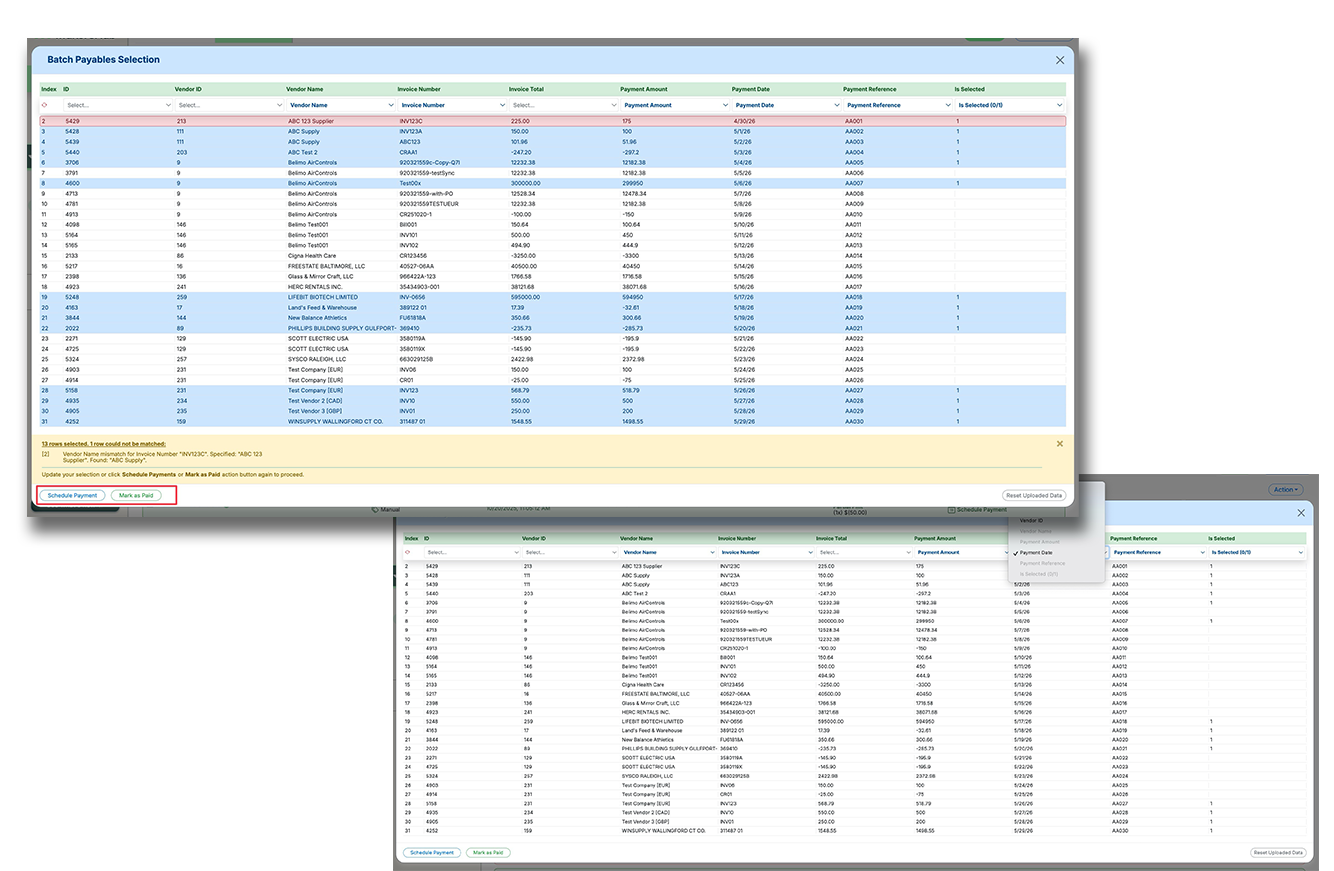
Batch Payables Selection makes it easier to pay or mark large groups of payables using a spreadsheet upload instead of manual clicking and editing. This helps high-volume accounts payable teams move faster, reduce errors, and handle more complex payment logic in fewer steps.
Upload a spreadsheet to batch select payables based on custom business logic, instead of selecting items one by one.
Map spreadsheet columns to fields like invoice details, vendor details, payment amount, payment date, reference number, and selection status.
Reconcile uploaded rows against outstanding payables, flag mismatches, and complete scheduling or mark-as-paid actions in one flow.
Recent Releases

24-Nov-25
Support for International Vendor Payment Details (IBAN)
We’ve added support for international vendor payment details using the IBAN system, beginning with EUR and GBP – a critical step toward enabling global payments. Vendors across 89 IBAN-enabled countries can now be added with proper validation for IBAN structure, country codes, and bank info. When entering payment details, the system performs real-time checks, provides Google Maps-powered address suggestions, and auto-detects the bank name, branch, BIC/SWIFT, etc., based on the IBAN provided. (This lays the final foundation for scheduling international transfers; true money movement and live FX quoting are still in progress.)
Now supports vendor bank details for EUR and GBP payments using IBAN across 89 countries
Real-time IBAN validation with auto-detection of bank name, branch, BIC/SWIFT, and address country checks
Enhanced address entry with Google Maps autocomplete and support for document uploads for added verification
24-Nov-25
International (FX) Payments Now Available
MakersHub now supports cross-border payments across all 87 countries in the IBAN network, enabling seamless vendor payments in EUR, GBP, CAD, and AUD, with more currencies on the way.With International Payments, users can now:
Add and validate foreign bank accounts using only an IBAN. No routing codes or manual verification steps needed.
View real-time FX rates at the time of payment scheduling. This gives you full transparency into the conversion rate applied to the transaction. MakersHub then handles the debit from your USD bank account and converts automatically.
Pay vendors in their local currency with instant settlement via SEPA, and send remittance notifications with both FX and USD amounts. This includes clear, bilingual visibility for international recipients. From there, MakersHub will automatically generate all associated accounting entries in QBO Multi-Currency. This includes proper handling of realized FX gain/loss — making analysis and reconciliation significantly easier.
24-Nov-25
Dashboard Summary Now Supports Multi-Currency + Partial Payments
This update brings full multi-currency support to the Dashboard Summary – ensuring each tile properly reflects your AP position, even as vendors, invoices, and payments span multiple currencies. (Raised during onboarding with Lupus Research, the need became clear after a test GBP invoice caused a discrepancy between AP Aging and the Dashboard.) Now all four dashboard tiles dynamically convert and display totals in your home currency, giving a consolidated view of outstanding liabilities – crucial when managing global payments. We also fixed a long-standing issue where the “Total Bills to Pay” tile didn’t account for partial payments. Previously it showed the full bill amount even if part was paid; now it reflects the true outstanding balance.
Dashboard Summary tiles now support multi-currency, showing totals converted to home currency for accurate liability tracking
Properly accounts for partial payments – showing true outstanding balances instead of full bill amounts
Improves global financial visibility for multi-currency organizations and supports more complex AP workflows
13-Nov-25
Unlimited Drag & Drop File Uploads
We’ve removed the upload bottleneck. Users can now drag & drop (or select) as many files as they want for processing – with no need to batch uploads in chunks of 10. Previously, the system limited uploads to 10 files at a time and blocked further uploads until the current batch finished – a major friction point for users with 20–30+ files. Now, files are added to a live upload queue, and users can continue dropping in new batches even while others are uploading. We also added status indicators so users can see which files are actively processing vs. queued – making the experience faster, clearer, and more scalable. (Internal limit remains 100 files per session, but that’s behind the scenes.)
Removed 10-file limit for uploads – users can now drag & drop or select large batches in one go
Live upload queue allows additional files to be added while uploads are in progress
Visual indicators show which files are processing vs. queued, improving clarity and control
23-Oct-25
Multi-Currency Support (QBO Accounting Integration Milestone)
We’ve hit a major milestone in rolling out our Multi-Currency (Forex) product – with full support for accounting and reconciliation now live for QuickBooks Online users. Users can assign home currencies, manage vendor records with fixed foreign currency settings, and record bills in non-USD currencies. Upon bill creation, MakersHub automatically fetches the historical mid-market exchange rate from Intuit, ensuring accounting accuracy to the transaction date. For reconciliation, foreign-currency bill payments can now be recorded using the actual home-currency cost, and we’ll auto-calculate the effective exchange rate to ensure proper matching between bill amounts and real bank outflows. (This update is behind a feature flag, available to selected accounts for controlled rollout/testing.)
Support for vendor records and bills in foreign currencies, with historical mid-market exchange rates pulled automatically from Intuit
Accurate reconciliation of foreign currency payments using real home-currency cost and auto-calculated exchange rates
Updated UI displays currency types clearly across views; multi-currency support is feature-flagged for phased rollout
23-Oct-25
E-Check Bulk Export (ZIP)
Users can export all e-checks from the Payment Archive in one zip file. Files are automatically named and include a reference spreadsheet. This simplifies printing at scale.
Bulk ZIP download
Auto-named files
Reference spreadsheet
23-Oct-25
Bulk E-Check Export for Faster, Safer Printing
We’ve expanded MakersHub’s E-Check capabilities with a new bulk export feature designed for teams that print and distribute checks in-store. This dramatically simplifies check printing for accounts that issue a high volume of vendor checks through MakersHub.. Users can now:
Export all E-Checks in a batch directly from the Payment Archive tab. One click automatically gathers every relevant E-Check in the filtered view and downloads them as a single ZIP file.
Receive neatly labeled check PDFs. Just like invoice downloads, each E-Check is reconstructed and named with: Payment ID Check number Vendor name Check amount
Access an included reference spreadsheet. The ZIP file also contains a structured CSV/Excel reference list for easy reconciliation and store-level handoff.
13-Oct-25
Vendor Internal ID Now Visible for Custom Integrations
For teams using Custom Integrations, distinguishing between vendors with similar or identical names has been a challenge – especially when relying on internal IDs for accuracy. Previously, vendor dropdowns and the bill review view only displayed the vendor Name, which was fine for most users. But for Custom Integration users like Vanguard Truck Centers and P1 Industries, internal IDs are key to ensuring correct vendor selection. With this update, we now display the Internal Vendor ID alongside the name wherever vendor selection or review happens – making it easier for AP teams to quickly identify and verify the right vendor.
Internal Vendor IDs now appear next to vendor names in dropdowns and the Bill Review screen for Custom Integration users
Helps prevent errors when vendors share similar or identical names
Supports workflows where AP teams rely on memorized or referenced internal IDs for vendor selection
10-Oct-25
Controlled Supervisor View for Direct Reports
As organizations grow and approval flows become more complex, we’ve introduced a new Supervisor View setting within User Settings – designed to give oversight without overexposure. Previously, visibility into bills/receipts was limited either to Standard users (only if in their approval flow or group) or Admin/Accounting Access (all bills). This all-or-nothing approach was limiting for teams wanting supervisors to oversee their direct reports’ documents without full company-wide access. With this update, Admins can assign a list of Direct Reports to any user. That supervisor can then view all bills/receipts their reports are assigned to – without being an approver themselves and without full admin access.
New “Direct Reports” setting allows controlled visibility for supervisors without granting Admin/Accounting Access
Supervisors can now view all bills/receipts assigned to their reports for oversight and coaching
Ideal for large organizations with layered approval flows and sensitive financial data segmentation
29-Sep-25
List View is Here: A New Way to Review Bills
We’ve introduced a List View option in the Bill Review tab, giving you a spreadsheet-like interface with sortable columns.
Toggle Between Tile & List Views: Choose the view that fits your workflow.
Click-to-Sort Columns: Organize your bills by due date, vendor, amount, and more—just like in your payables tab.