
Resources
Product Updates
Stay up to date with the latest improvements to MakersHub. Here you’ll find new feature announcements, performance enhancements, and quality-of-life updates - all designed to help you work smarter.

Feature Release
April 23, 2026
Batch Payables Selection
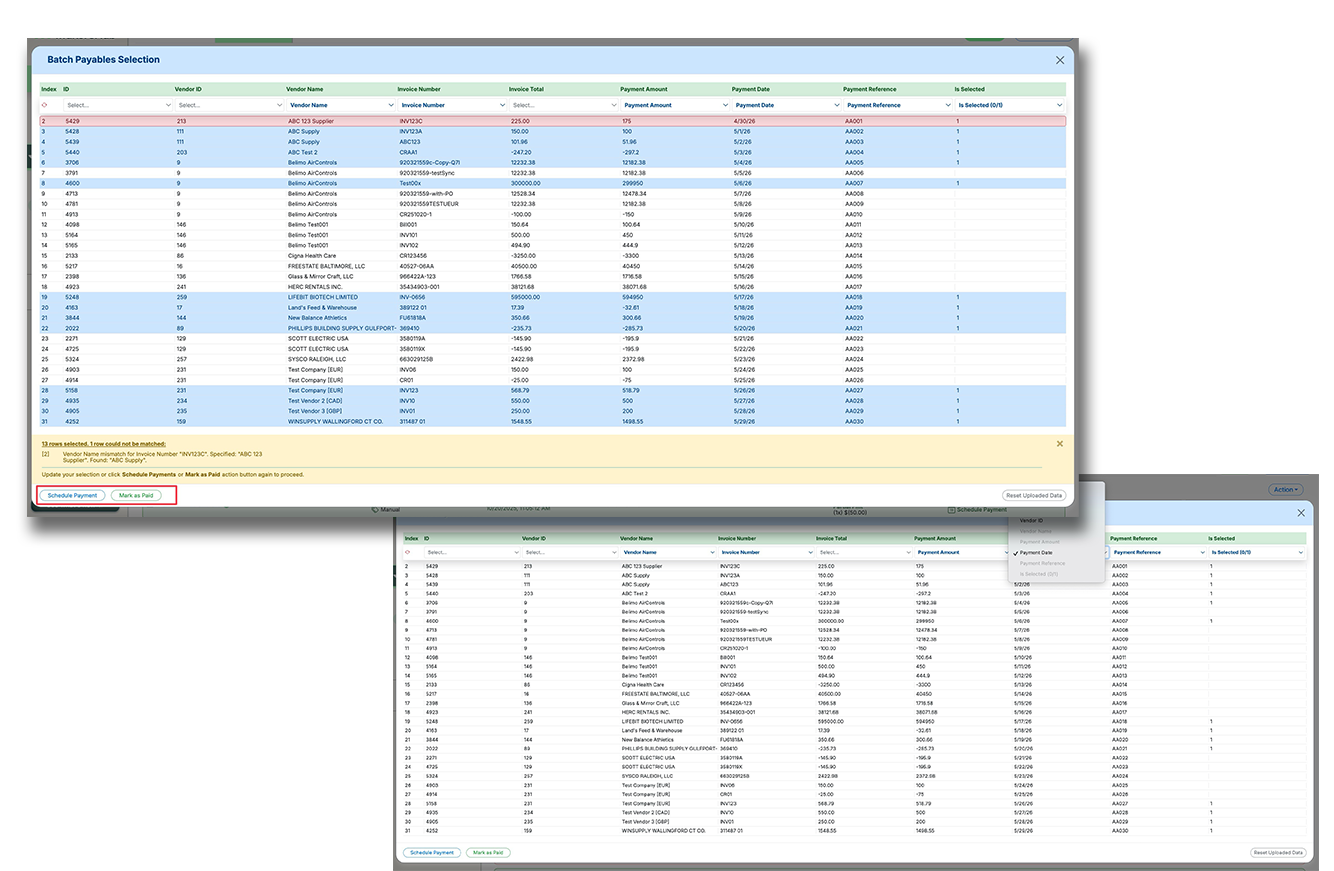
Batch Payables Selection makes it easier to pay or mark large groups of payables using a spreadsheet upload instead of manual clicking and editing. This helps high-volume accounts payable teams move faster, reduce errors, and handle more complex payment logic in fewer steps.
Upload a spreadsheet to batch select payables based on custom business logic, instead of selecting items one by one.
Map spreadsheet columns to fields like invoice details, vendor details, payment amount, payment date, reference number, and selection status.
Reconcile uploaded rows against outstanding payables, flag mismatches, and complete scheduling or mark-as-paid actions in one flow.
Recent Releases
28-Sep-25
Improved User Management with Search & Indexing
As organizations scale their teams on MakersHub, managing a long list of users was becoming unwieldy. We’ve made a meaningful update to the User Settings page by introducing search and indexing capabilities to streamline user management. Admins can now search users by Name or Email, or filter by Roles or Direct Supervisor – making it faster and easier to locate and update user settings without endless scrolling.
New search functionality allows lookup by Name or Email directly within the User Settings page
Filter users by Role or Direct Supervisor for easier team management at scale
Reduces admin overhead as user lists grow – no more scrolling through long lists to find a user
25-Sep-25
Improved Vendor Recognition with Ignored Name/Phone Training Rules
We’ve enhanced our WiseVision data extraction engine to better handle cases where vendor identification can be misleading due to invoice formatting. Previously, the system relied heavily on Vendor Name and Phone Number as the primary “signature” for training – but certain layouts (e.g., utility bills or distributor invoices) showed customer-facing names more prominently than the actual vendor, leading to incorrect auto-matching when users inadvertently trained on misleading identifiers. To solve this, we introduced a configurable field under Bill Settings where users can define names or phone numbers to ignore during extraction. The system will skip those, leading to more accurate vendor recognition and smarter ongoing training.
Users can now configure a list of names/phone numbers to ignore during vendor extraction using comma and “+” logic
Prevents incorrect vendor training when high-visibility but irrelevant info (e.g., parent brands or customer stamps) dominates the invoice layout
Improves reliability of vendor matching across edge cases – especially utilities, franchises, and group purchasing invoices
25-Sep-25
Additional Export Fields (Entity & Vendor IDs)
Exports now include entity IDs, vendor IDs, and related identifiers. This improves reconciliation with external systems. Users get more context.
Entity IDs included
Vendor IDs included
Better reconciliation
18-Sep-25
Expanded Integration Mapping: Locations, Departments, and Ship/Bill-To Fields
We’ve rolled out a major enhancement to Integration Mapping – unlocking more flexibility for users to auto-map accounting fields based on a broader range of invoice data. Previously, mapping rules could only use Vendor Name, Description, or PO Number. With this update, users can now map to Locations and Departments – top-level fields frequently requested by teams using dimensional accounting setups. In addition, we added support for mapping based on Bill To: Name/Address and Ship To: Name/Address fields. These often hold key context for routing expenses to the correct job, class, or department. Each of these is also trainable (just like POs), enabling even smarter automation over time.
New mapping support for Locations and Departments to accommodate more complex accounting structures
Users can now map based on Bill To / Ship To Name & Address – often key indicators of job or class assignment
All new fields are trainable and fully integrated into the existing mapping engine for automated field assignment
2-Sep-25
Payment Credits Wallet Breakdown
MakersHub now separates Monthly Credits from Forever Credits to clarify usage. Expiring credits are consumed first automatically. Users can view all transactions in a detailed ledger.
Clear credit breakdown
Expiring credits used first
Full transaction ledger
2-Sep-25
Monthly vs. Forever Credits Breakdown
To improve clarity around credit usage and allocation, we’ve introduced a clear breakout between Monthly Credits and Forever Credits in the Billing tab. Monthly Credits are part of a user’s recurring allocation and expire each cycle, while Forever Credits include purchased or air-dropped credits that do not expire. When users spend credits (e.g., to schedule a payment), we will always deduct from Monthly Credits first – then draw from Forever Credits only as needed. All activity is fully traceable in the MHPC transaction ledger, and if a payment is deleted, the consumed credits are correctly refunded to the appropriate wallet.
Credits now categorized as either Monthly (expiring) or Forever (non-expiring) in the Billing tab
Monthly Credits are always consumed first before dipping into Forever Credits
All credit activity is tracked in the transaction ledger, including refunds on deleted payments
2-Sep-25
MakersHub Now Integrates Seamlessly with Sage Intacct
Our direct two-way integration with Sage Intacct is officially live! Automate your entire AP process—from bill capture through final payment—while keeping your ERP fully in sync.
What it supports: ✔️ Entities / Locations ✔️ GL Accounts ✔️ Vendors / Suppliers ✔️ Projects / Jobs ✔️ Items ✔️ Departments / Classes
Unlike clunky third-party connectors, our integration is built fully in-house, ensuring speed, accuracy, and stability at scale.
31-Aug-25
Entity Names Now Included in Billing Notifications
Managing multiple entities just got easier. When CPAs and finance professionals receive billing notifications, they now include the name of each managed entity tied to the subscription charge—plus a direct link to an interactive billing portal.
Entity-Level Clarity: No more guessing which client a charge is for. The entity name is now shown clearly in the billing email.
Interactive Invoice Access: Click the link to view detailed billing info in a portal—no more PDF downloads required.
3-Aug-25
Smart Data Connect: Now With PO Matching, Vendor Credit Imports & More
Smart Data Connect is our fast, flexible way to bring your payables data into MakersHub, no complex integrations required. We've added some additional enhancements, including:
Bill-to-PO Matching: You can now match bills to purchase orders or item receipts—even if you’re not connected to an ERP. MakersHub will reconcile received quantities and automatically close out POs for you.
Import Open Bills & Vendor Credits: Seamlessly bring in historical payables data—including vendor credits—to get started faster with a complete AP picture.
Beta: API-Based Data Ingestion: For select customers, we’re testing the ability to send data directly to MakersHub via API—enabling broader, automated integrations with other tools and workflows.
31-Jul-25
AP Aging Summary View for High-Volume Payables
We’ve introduced a powerful new AP Aging Summary View in the Accounts Payable tab – a must-have for enterprise companies managing high volumes of bills and fast cash cycles. This view groups all approved-but-unpaid bills by aging buckets (e.g., Not Due, 1–30 Days Past Due, etc.), making it much easier to prioritize and schedule payments. No more manual filtering or piecemeal selection – users can now expand aging ranges, view grouped bills, and schedule payments in bulk. This saves significant time for teams handling hundreds or thousands of bills each month.
New AP Aging Summary groups all unpaid bills by due date ranges directly in the Accounts Payable tab
Users can expand any aging range to view and bulk-select bills for payment or mark them as paid
Streamlines payment scheduling for high-volume AP teams – no need for complex filters or manual sorting