
Resources
Product Updates
Stay up to date with the latest improvements to MakersHub. Here you’ll find new feature announcements, performance enhancements, and quality-of-life updates - all designed to help you work smarter.

Feature Release
April 23, 2026
Batch Payables Selection
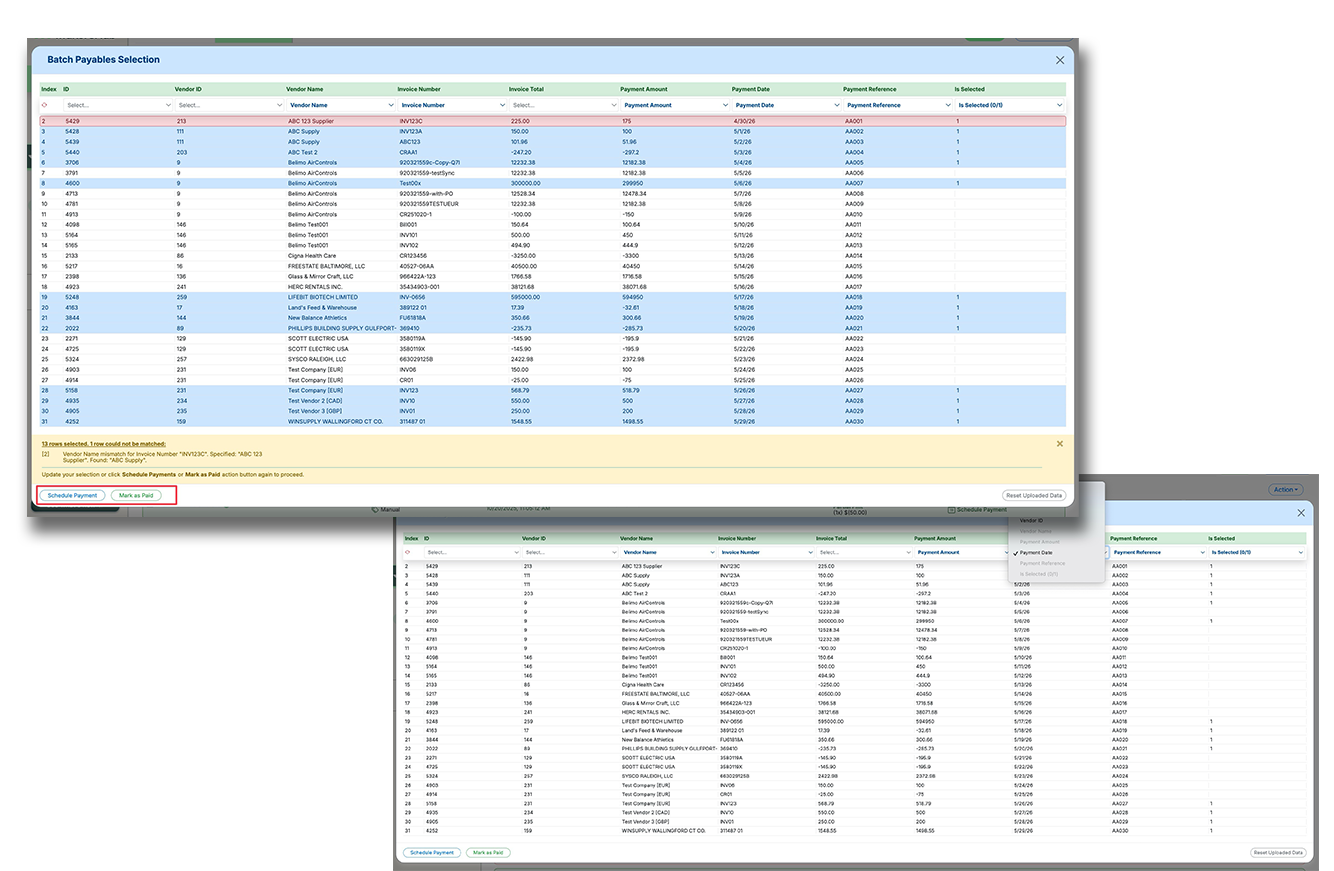
Batch Payables Selection makes it easier to pay or mark large groups of payables using a spreadsheet upload instead of manual clicking and editing. This helps high-volume accounts payable teams move faster, reduce errors, and handle more complex payment logic in fewer steps.
Upload a spreadsheet to batch select payables based on custom business logic, instead of selecting items one by one.
Map spreadsheet columns to fields like invoice details, vendor details, payment amount, payment date, reference number, and selection status.
Reconcile uploaded rows against outstanding payables, flag mismatches, and complete scheduling or mark-as-paid actions in one flow.
Recent Releases
31-Jul-25
AP Aging Summary: Know What’s Due, and When
Our new AP Aging Summary gives you a clear, organized view of all your outstanding bills—grouped by how overdue they are.
Automatic Aging Buckets: See bills grouped by status; Current, 1–30 Days Past Due, 31–60 Days, 61–90, and 90+.
Click to Filter & Take Action: Want to focus on 90+ day past due bills? Just click the aging group, review vendor-specific totals, and schedule payments. All from the same view.
Drill Down by Vendor: Click into each vendor group to view all related bills in one place.
28-Jul-25
Sage Intacct Integration (Multi-Entity & Department Support)
We’ve launched initial support for Sage Intacct integration, now live in production (rolling out with GenZ as our first customer). This release includes full support for multi-entity (locations) and multi-dimensional (department/class) configurations, enabling seamless AP workflows across complex org structures. Users can perform all standard AP operations – bill capture, review, payments – with auto-mapping for key fields like accounts, classes, and customers. (Note: Purchase Order workflows not yet supported due to Intacct’s multi-step PO→Bill structure; support planned in a future phase.)
New Sage Intacct integration now supports multi-entity and department-level configurations
Enables standard AP operations: bill extraction, approvals, payments, and auto-mapping of financial dimensions
Purchase Order workflows are not yet supported due to Intacct’s multi-step PO-to-bill structure (coming in a future release)
28-Jul-25
Sage Intacct Integration
MakersHub added Sage Intacct integration for enterprise AP. Core workflows are supported with multi-entity capabilities. This expands enterprise support.
Connect to Intacct
Multi-entity support
Standard AP workflows
24-Jul-25
AP Trial Balance Report Now Available
We’ve added the ability to generate an AP Trial Balance Report – a key feature for users relying on Custom Integration flows where bill-level data may not fully sync back to their accounting software. This report provides a snapshot of all outstanding payables owed to vendors as of a specific date, critical for accurate balance sheet reporting. Users can select a reporting date, sort the data in-app, and export to Excel as needed. (This helps answer questions like “What was my AP balance at the end of May?” – normally done in an ERP, now possible even with manual/partial integrations.)
Generate AP Trial Balance Reports based on any selected ending date directly in the AP dashboard
View and sort vendor balances in-app or export to Excel for further analysis and financial reporting
Essential tool for Custom Integration users who need balance sheet accuracy without full ERP sync
21-Jul-25
WiseVision Training Window Improvements
WiseVision training now launches with one click and can move freely on screen. Users can review data without closing training. This streamlines corrections.
One-click training
Movable window
See data underneath
21-Jul-25
Prox Net Terms Configuration
Users can configure how prox terms roll into future months. This supports vendor-specific interpretations of due dates. Calculations are now predictable.
Configurable prox logic
Vendor-specific rules
Accurate due dates
21-Jul-25
Net Terms Natural Language Display
Extracted net terms are now described in plain language. Users can verify due date logic before approval. This reduces misunderstandings.
Plain-language terms
Verify extraction
Reduce mistakes
21-Jul-25
Net Terms Extraction Improvements
Net terms extraction now provides clearer and more accurate results. Users can see how due dates are calculated. This reduces payment timing errors.
Clearer extraction
Visible due date logic
Fewer mistakes
13-Jul-25
List View Now Available on Bill/Review Tab
A long-requested feature is finally here: users can now switch to a List View on the Bill/Review tab. This new layout provides a cleaner, table-style experience that mirrors traditional AP workflows – with enhanced readability and quick access to key bill data. Users can toggle between the original tile view and the new List View at any time, and the List View supports column sorting (like the Payables tab) to help teams organize and prioritize their review queue. (Kudos to the engineer who led this refactor.)
New List View toggle added to Bill/Review tab for streamlined, table-style bill management
Click-to-sort functionality on key columns enables faster review and prioritization
Users can switch between tile and list views to match their preferred workflow
10-Jul-25
E-Checks Are Here: Faster, Safer, Trackable Check Payments
For finance teams that still rely on checks but need a modern, secure way to send them—E-Checks by MakersHub are now live.
Instant Delivery: Send check payments electronically—no special printers or paper required. Vendors receive them by email, print on plain paper, and deposit via mobile deposit—often same day.
Fraud Protection: Each payment is secured with Positive Pay, ensuring the bank verifies check number, payee, and amount before clearing.
Full Visibility: Track checks in real time. Know exactly when they’re delivered and deposited.