
.svg)
This spring, we attended three conferences: Accelerate 2026 in New Jersey, Firm Growth Forum in San Diego, and Intuit Get Connected in Calgary. Across all three, we had the same conversation dozens of times with CAS firm owners, advisory bookkeepers, and outsourced accounting professionals managing clients in construction, trade services, and restaurants.
The conversations weren't exclusively about AP software. They all started with a client - like a construction group whose bills needed to hit three cost dimensions before anything posted, a restaurant group across fourteen locations with approvals that kept ending up in the wrong inbox, or a trade client whose vendor sent a single PDF every month with six separate bills inside it and no indication of where any of them belonged.
In every conversation, the client was the entry point. Software was just the thing they were trying to find because the client had finally made the existing approach untenable.
The client that breaks the workflow is usually a construction or restaurant business
Why these two industries kept coming up
At all three events, the firms that engaged most seriously were thinking about a specific client, and that client was almost always running a construction business, a restaurant group, or a trade services operation. Not because those are the only industries that create AP complexity, but because they're the ones that expose the limits of a generic AP workflow fastest.
Construction businesses have bills that need to land on the right job, phase, and cost code before anyone approves them - and yet, change orders arrive without job codes. A single subcontractor bill might need two different approvers depending on which job the line items belong to. When the coding is wrong at intake, it travels into job costing and into the financials a project manager uses to decide whether a job is tracking against budget.
Restaurant groups have their own version of the same problem. Food cost runs at 30-40% of total spend for most operators. Line-item detail from supplier bills like Cisco, US Foods, and local distributors feeds the food cost tracking that tells an owner whether a menu item is profitable or not. When AP automation captures only invoice totals, that detail disappears.
Both industries put the same pressure on a CAS firm's AP process: high bill volume, coding that has to be right before anything posts, and approval chains that don't fit a single queue. When the AP tool can't handle it, the firm does it by hand.
What line-level accuracy requires
The firms we spoke to needed line-level accuracy, not speed. A bookkeeping firm in Winnipeg serving commercial construction and residential trade clients described the problem directly: a single bill often needs different lines routed to different jobs, with different approvers for each. That's not a routing configuration most AP tools support. It requires the platform to understand the bill at the line level, not just the header.
Line-item detail is where most AP tools stop working
What line-item extraction looks like on a real bill
The strongest reactions at all three events came during demonstrations involving line-item extraction. The concept wasn't new to anyone in the room. Seeing it work on the bills their clients send every day was.
One bookkeeper in Calgary works with clients whose Sysco bills run to a thousand pages with individual line items each needing a chart-of-accounts code. Another described clients who annotate their receipts: highlight them, write on them, note the business-versus-personal split percentage directly on a bank statement. Standard OCR tools break on documents like these, either erroring or extracting a total and losing everything underneath it.
The difference between a tool that "reads invoices" and a tool that reads every line of every bill (fuel surcharges, annotated receipts, split percentages written directly on a bank statement) is the difference between processing data and actually understanding it.
When coding instructions aren't on the bill
Our conversations in Calgary surfaced something that rarely shows up in AP software marketing: the coding instruction that lives outside the bill entirely.
One firm described a purchase that needed to be split between two projects (building beds for children and a homeless shelter) with the split documented in a board motion, not on the invoice. The only "receipt" for a separate transaction was an email containing that board motion authorizing a $2,000 grant. Standard OCR has nowhere to put this. The bookkeeper becomes the connection between the documentation and the ledger, manually, every time.
MakersHub's approach to bills like these is to read the full context, not just the document.
AP tools promised AI for years. Firms are no longer impressed by that promise.
The question on the floor at Firm Growth Forum
The question that kept coming up at Firm Growth Forum: "Why do I still have to train the system if it has AI?"
The firms asking had tried tools that claimed AI-powered automation. They’d gone through the implementation, built the rules, mapped the vendors, trained the system - and in the end, they were left with a tool that automated the straightforward bills and handed back the hard ones. Which is most of the bills for a construction or restaurant client.
Their expectation has shifted. Firms are no longer asking whether a tool uses AI, but why they're still doing manual work after the AI is implemented. The gap between what "AI-powered" signals in marketing and what it delivers in practice has become the central trust problem in this category.
What WiseVision does differently
WiseVision reads every line on every bill and lets you work with what it finds. You can tell it to assign GL accounts based on a client's chart of accounts, surface pricing discrepancies across a supplier's recent bills, or split costs by class. It reasons through the client's actual data, explains what it did, and codifies that logic so the same judgment applies automatically next time, for that client, without manual reconfiguration.
For CAS firms, that distinction is operational. A tool that needs per-client rule setup before it works demands setup time for every new engagement. WiseVision works from the accounting data that already exists in the client's QuickBooks setup.
Approval routing is where most AP tools show their limits
What the approval problem looks like on the ground
At all three events, approval complexity came up as one of the most common reasons a firm had started looking for a new tool. They had functioning approval processes, but with structures their existing AP tools couldn’t support.
A fractional CFO attending the Calgary event described field and remote approvers who won't log into the main accounting system. "Half the time it's difficult. They don't want to do it." The approval workflow designed for the office doesn't translate to a field supervisor reviewing bills between dispatches on a phone.
A Winnipeg-based construction firm described a similar problem: a single bill needing different lines routed to different approvers depending on which job they touched. The current tool treated the bill as one approval event. The actual approval logic required it to be several.
What a routing structure built for this looks like
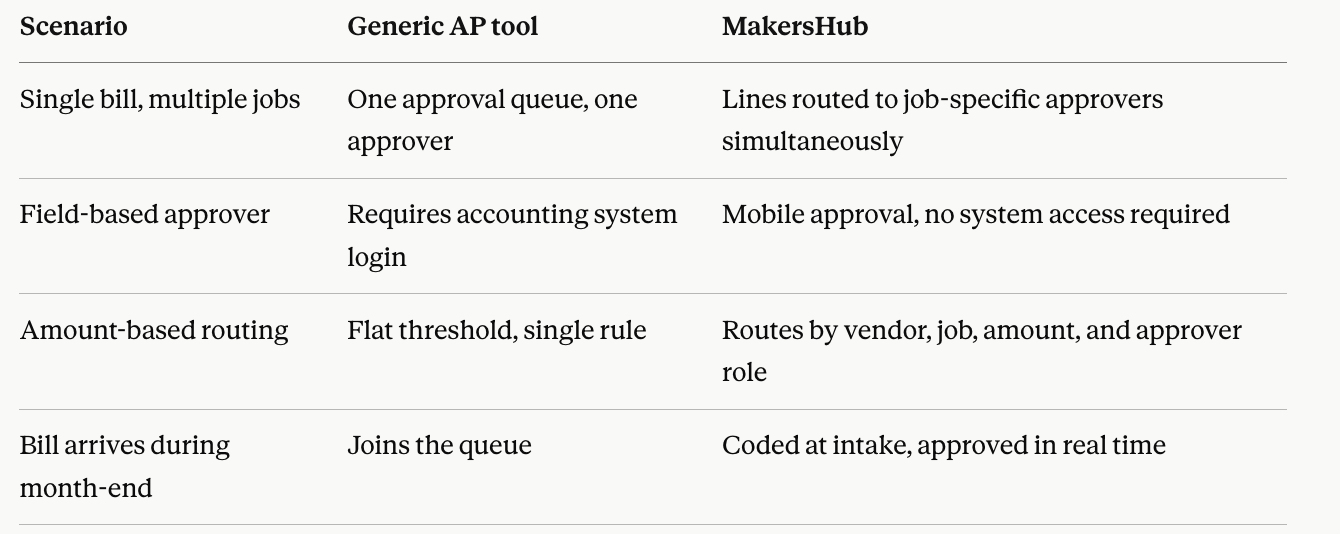
These approval problems the firms described happen when AP tools apply a one-size-fits-all solution to every bill, regardless of what's on it or who owns it.
Why Canadian AP breaks in month two
What "supports Canada" looks like after implementation
Every Canadian firm at the Calgary event shared a version of the same story. They found an AP tool. It said it supported QuickBooks Desktop. They went through the sales process, the demo, the implementation. And then, somewhere in month two or three, they found the ceiling: the platform read bills at the header level, posted a lump sum to QuickBooks, and left the GST/PST/HST reconciliation to the bookkeeper.
The Canada Revenue Agency requires line-item level tax calculation. GST and HST calculate differently depending on the vendor, the purchase category, and the nature of the transaction. PST varies by province. A single subcontractor invoice covering labor, materials, and equipment rental across two job sites isn't one tax event - the lines need to be read, understood, and taxed individually before anything posts. A tool that extracts an invoice total and applies a blanket tax rate produces books the bookkeeper then has to fix.
How MakersHub handles Canadian tax
MakersHub integrates with QuickBooks at the custom field and line level. Tax codes come over from QuickBooks exactly as the customer has configured them -- no rebuilding the tax structure, no reconfiguring the chart of accounts. GST and HST calculate at the line level. PST exceptions run through mapping rules applied by vendor, by purchase category, and by province.
The result is that the penny reconciliation problem goes away. Bills reconcile at the line level the first time. The manual QuickBooks corrections that were eating time at every month-end close stop being a recurring task, because the tax treatment was right before anything posted.
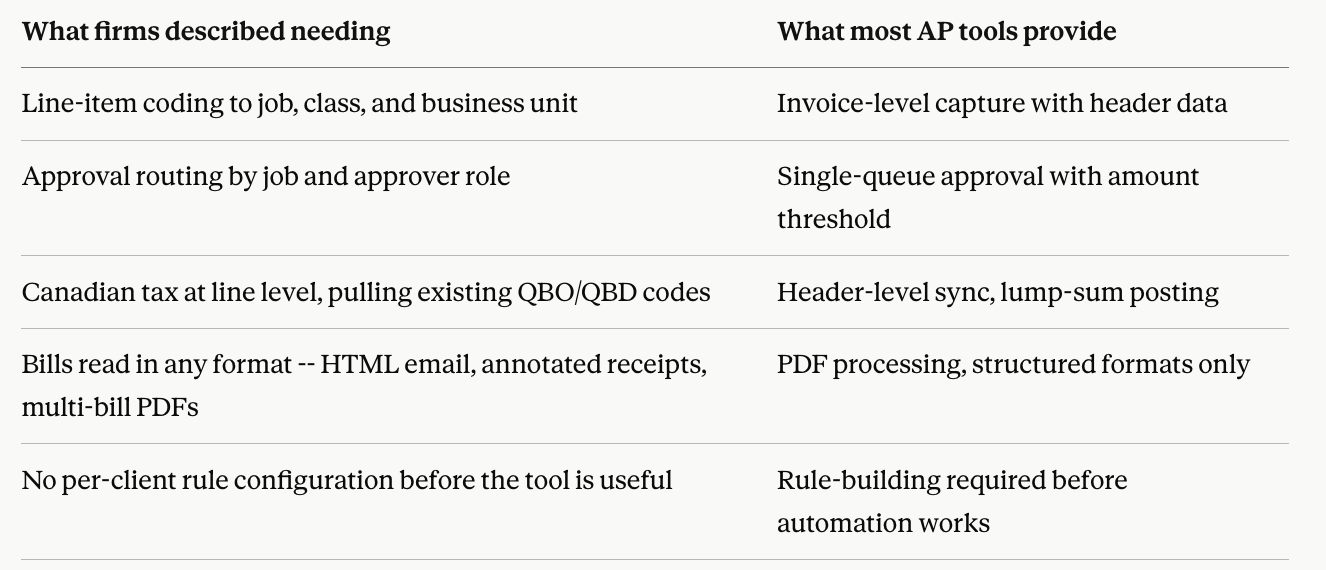
What firms said they were looking for, compared to what most tools offer
FAQs
What AP automation features do CAS firms need most for construction clients?
Construction clients require line-item coding to job, phase, and cost code at bill intake, not reconstructed at month-end. Approval routing needs to support multi-job bills where different lines go to different approvers. PO matching that flags discrepancies before approval is the other capability that comes up consistently. Generic AP tools handle the straightforward bills; it's the change orders, partial deliveries, and split-job bills where the process breaks.
How does MakersHub handle Canadian GST, HST, and PST?
MakersHub calculates GST and HST at the line-item level, pulling tax codes directly from the customer's existing QuickBooks setup. PST exceptions run through mapping rules applied by vendor, purchase category, and province. The integration goes to the custom field level in QuickBooks Desktop, where CRA-compliant tax codes are stored.
Why do AP tools fail on restaurant clients specifically?
Restaurant AP involves high bill volume from a concentrated set of suppliers, with line-item detail that feeds food cost tracking. A tool that captures only the invoice total loses the SKU-level data that tells an owner whether a menu item is profitable. Multi-location restaurant groups add entity-level coding requirements on top of that. The approval workflows also tend to involve managers who are on the floor, not at a desk, which creates the same field-approver problem that construction clients do.
What does "line-item extraction" mean versus standard invoice OCR?
Standard OCR reads the document and extracts the header data: vendor name, invoice total, date, invoice number. Line-item extraction reads every row (description, quantity, unit price, tax treatment, any surcharges or credits) and produces structured data for each line. The difference matters because coding, PO matching, and approval routing all operate at the line level in operationally complex businesses. A total is a payment. The lines are the record.