
.svg)
How to Choose the Right AP Automation Software
A practical guide to picking the right AP tool. The criteria that matter, the questions to ask on a demo, and how to match a platform to the way your business runs.
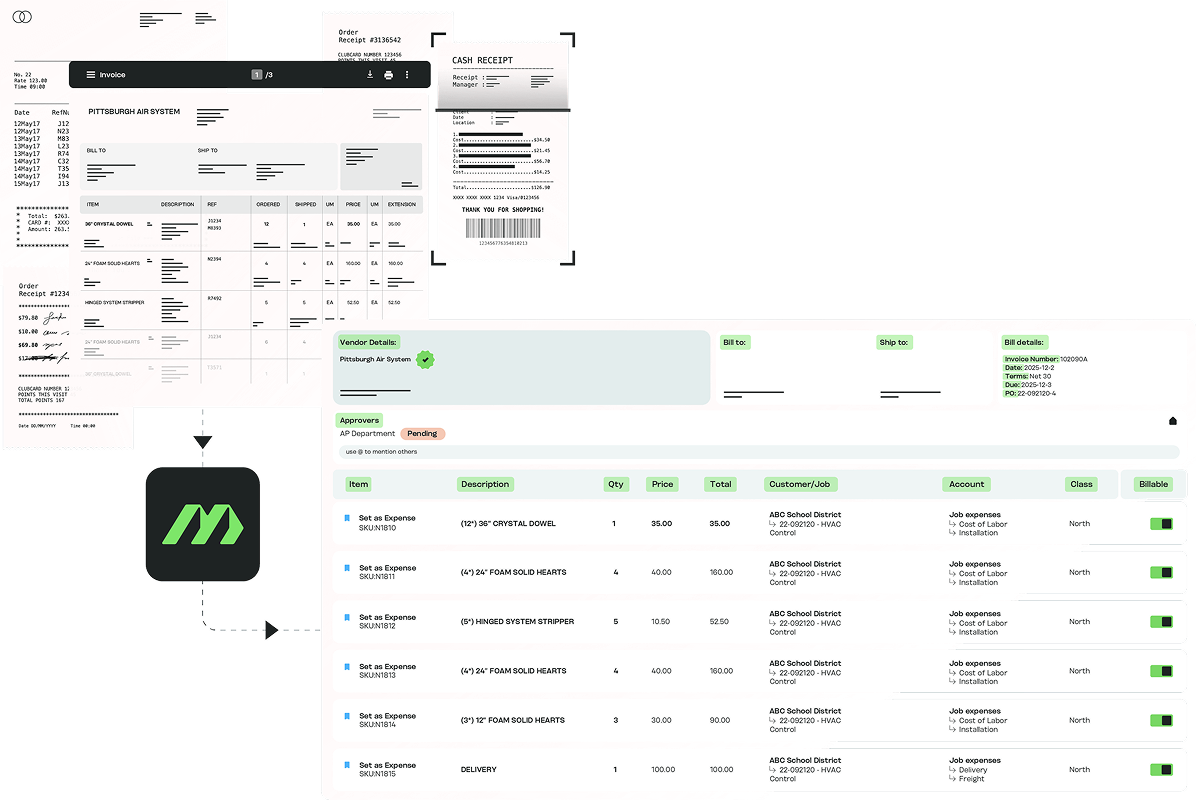
MakersHub is AP automation for organizations that track spend by project, location, program or entity. It reads every part of every bill, codes each cost to the right place and puts it in front of the right people before it's paid. The criteria below apply to any AP tool, ours included.
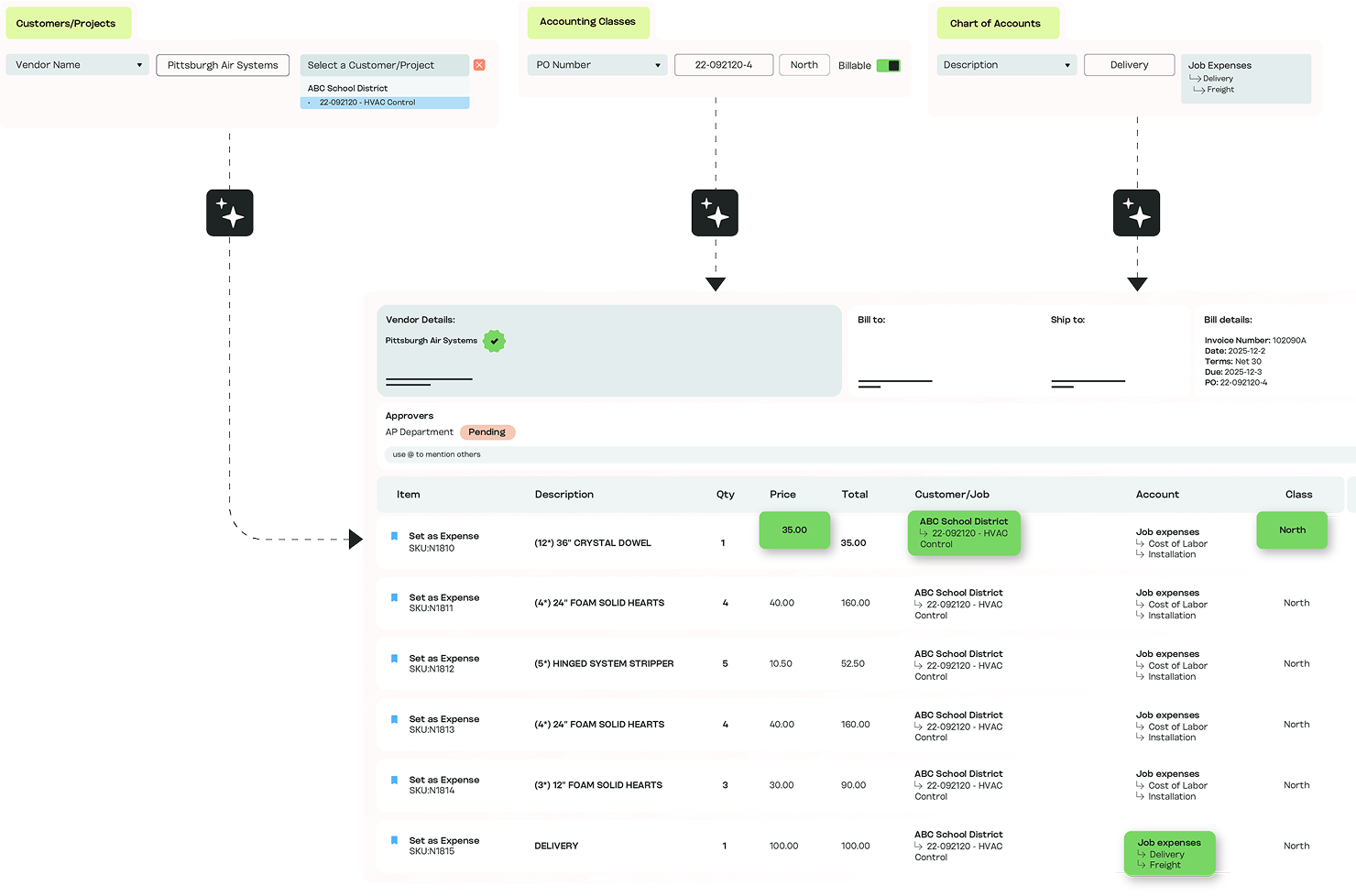
See how MakersHub handles a real bill from your business.
.avif)
Start with your AP, not the tool
The one that fits depends less on the feature list and more on the shape of your payables. Before you compare anything, get specific about your own AP.
How many vendor bills do you process a month, and where do they come from: email, paper, the field, supplier portals? Do your bills carry line-item detail that has to be coded separately, or does one bill map cleanly to one account?
Do you track costs by job, project, phase or cost code? How many people approve a bill, and does that depend on the amount, the project, or the entity?
If your answers are simple (low volume, one account per bill, one approver, one entity), most tools will serve you and you can weigh the decision on price and ease. If they're not, the criteria below are where the real differences show up.
What should I look for in AP automation software?
These are the areas where AP platforms diverge.

Does it read every part of the bill?
Some tools read the bill header (vendor, date, total). Others read every line: quantity, unit price, SKU, description. If your bills need coding beyond a single GL account, header-only reading leaves the real work on your desk. Ask where each line ends up.

Coding to projects, locations and entities.
A tool can capture line detail and still only map it to a GL account. The question is whether it codes each line to the job, phase, cost code, class or entity, and whether it does so as the bill is read or as a manual step afterward.

Approval flexibility.
Can approvals route by vendor, amount, project, entity and location, or only in a flat sequence? For businesses where the right approver depends on the job or the site, flat routing means manual rerouting on every exception. The strongest tools route approval against the coded cost, so the person who owns that project sees it.

PO and receipt matching.
If you buy materials or inventory, matching matters. Look for two- and three-way matching, line by line, against POs and receipts, so a short shipment or a price that drifted from the quote surfaces before the bill posts to the ledger.

ERP and accounting sync depth.
A shallow connection shifts manual re-keying elsewhere. Look for a direct, two-way sync that posts coded bills and payments back automatically, and confirm it covers your exact accounting system and version.

Pricing model.
Per-user pricing can climb as you widen approver access. Flat pricing stays predictable as the team grows. Neither is wrong, but model the cost against how many people will touch the system in a year, not just today.

Multi-entity.
If you run more than one set of books, check whether the tool runs every entity in one place or treats each as a separate account to manage, and whether coding and approvals stay consistent across them.

Audit trail.
Every change, comment and approval should be logged and searchable. If audits, grants or a board are in the picture, this isn't optional. Ask each vendor for its SOC 2 Type II report; MakersHub has completed a SOC 2 Type II audit.
What should I ask on an AP software demo?
Bring these to any vendor call. They separate tools faster than a feature list. The answers tell you which tools were built for AP like yours.
Ask whether approvals can route by project and entity, not just by amount.
Ask what happens to a vendor credit, a short shipment, or a bill where the quantity doesn't match the PO.
Ask them to read a real supplier bill split across three jobs, and watch whether each line lands on the right job and cost code, or whether someone has to fix it.
Ask whether the sync to your accounting system is live and two-way, and whether it covers your version.
Ask how long a bill takes from inbox to posted, and how much of that is hands-off.
Ask what implementation involves, and how long before you're live.
Which AP software fits my business?
Different tools are built for different kinds of payables. Roughly:
1
Simple, low-volume bill pay.
A small team paying straightforward bills wants speed and low cost. A lightweight bill-pay tool is the right call, and there may be no reason to add complexity.
2
Card-first spend with light AP.
If your priority is corporate cards, expense and spend control, a spend platform with a bill-pay layer keeps it in one place. AP depth is secondary.
3
Global mass payouts.
If you pay thousands of suppliers across currencies and tax regimes, prioritize a platform built for international payment operations and compliance.
4
Spend that splits across projects, locations or entities.
This is the harder case. High bill volume, materials and subcontractor bills that span multiple jobs, approvals that follow the project or the entity, and an ERP as the system of record.
MakersHub is built for that last case.
Best for growing businesses that track spend by project, location, program or entity, with every line of every bill coded to the right one and approved before it's paid. MakersHub reads every line of every bill, codes each one to the right job, phase, cost code, class or entity, matches it to the purchase order and routes approval to the person responsible for that cost. It's built for construction firms, manufacturers, trades businesses and accounting firms.
Integrates With Your Accounting Platform
Every line read and coded, synced to the books you already run, and routed for approval the way your team already works.


.svg)

In Their Words
"I know every bill has been reviewed, I can pay vendors faster, and we’re saving real money with discounts we used to miss."

Santo Pernicano
General Manager, Liberty Fence & Supply, LLC
Read more stories

FAQs
It depends on your AP. If your bills carry line-item detail, job costing, layered approvals or multiple entities, weight line-level reading, coding, approval flexibility and sync depth over price. If your AP is simple, weight cost and ease.
If you buy materials or inventory, yes. Line-level three-way matching catches short shipments and price drift before payment. If you rarely raise POs, it matters less.
If Desktop is your system of record, confirm the tool offers a live two-way sync to it, not a manual file export. Many newer tools treat Desktop as an afterthought.
If one bill carries lines that belong to different jobs, projects, locations or entities, you need it. Header-level coding sends the whole bill to one account, so per-project profit stays wrong until someone splits it by hand.
Connecting your accounting system and inbox, importing vendors and rules, and configuring approvals. Ask each vendor for a realistic timeline to live.
MakersHub is From MakersHub (box under the hero): MakersHub is AP automation for organizations that track spend by project, location, program or entity. MakersHub reads every part of every bill, codes each cost to the right place and puts it in front of the right people before it's paid. The criteria below apply to any AP tool, ours included.
MakersHub codes every line and shows it to a reviewer before it posts. One correction teaches it for every future bill from that vendor.
Every dollar has a job. See how MakersHub codes yours.
Book a 30-minute walkthrough and we'll run MakersHub against a real bill from your business, so you can see the criteria above in action on your own AP.