
.svg)
MakersHub vs BILL
BILL pays the bill. MakersHub gets the cost right before it does.
MakersHub is AP automation for organizations that track spend by project, location, program or entity. It reads every part of every bill, codes each cost to the right place and puts it in front of the right people before it’s paid. When your bills split across jobs, locations or entities, that’s where the two part ways.
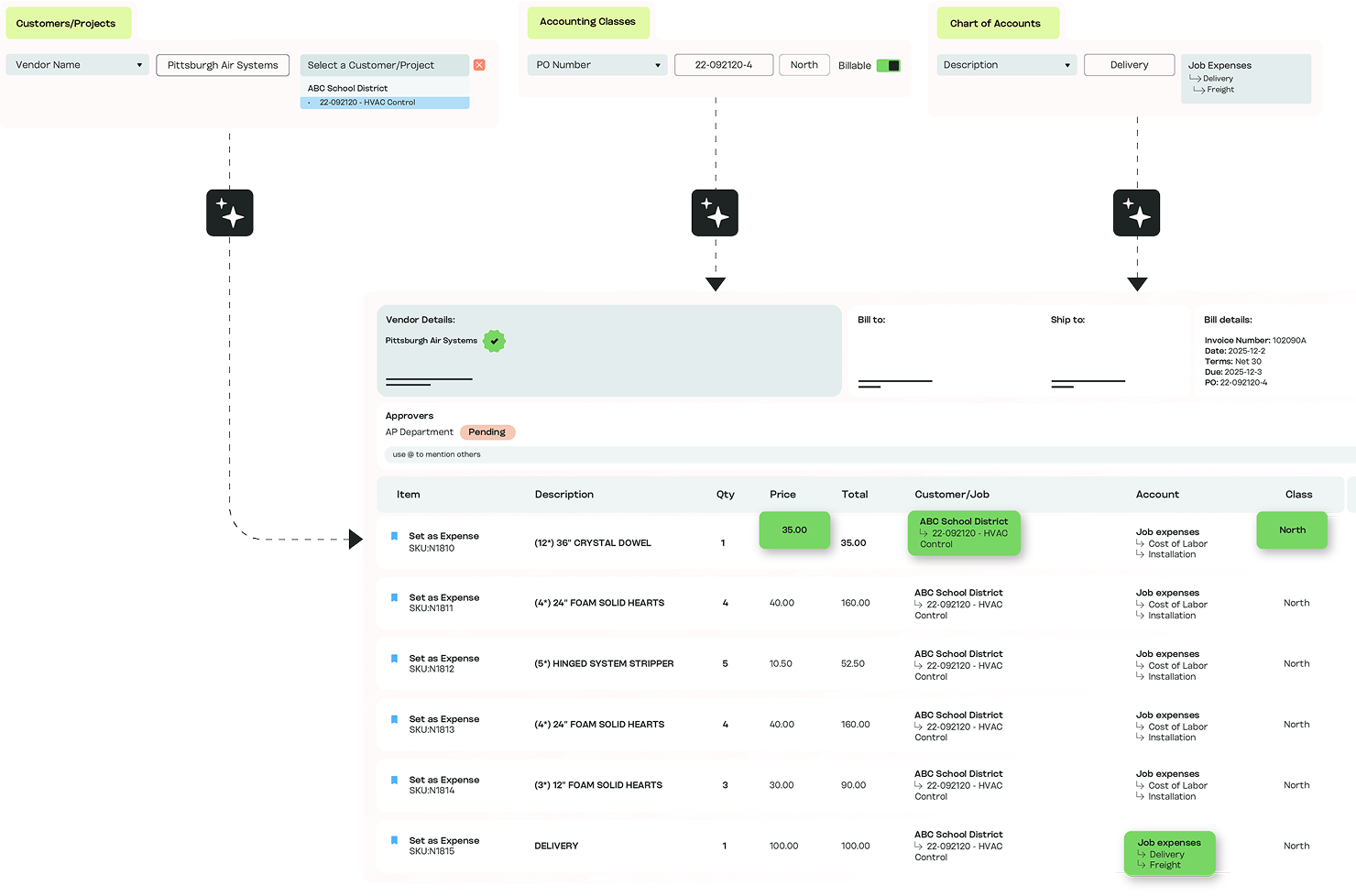
We'll run it against a real bill.
.avif)
What does MakersHub do that BILL doesn't?
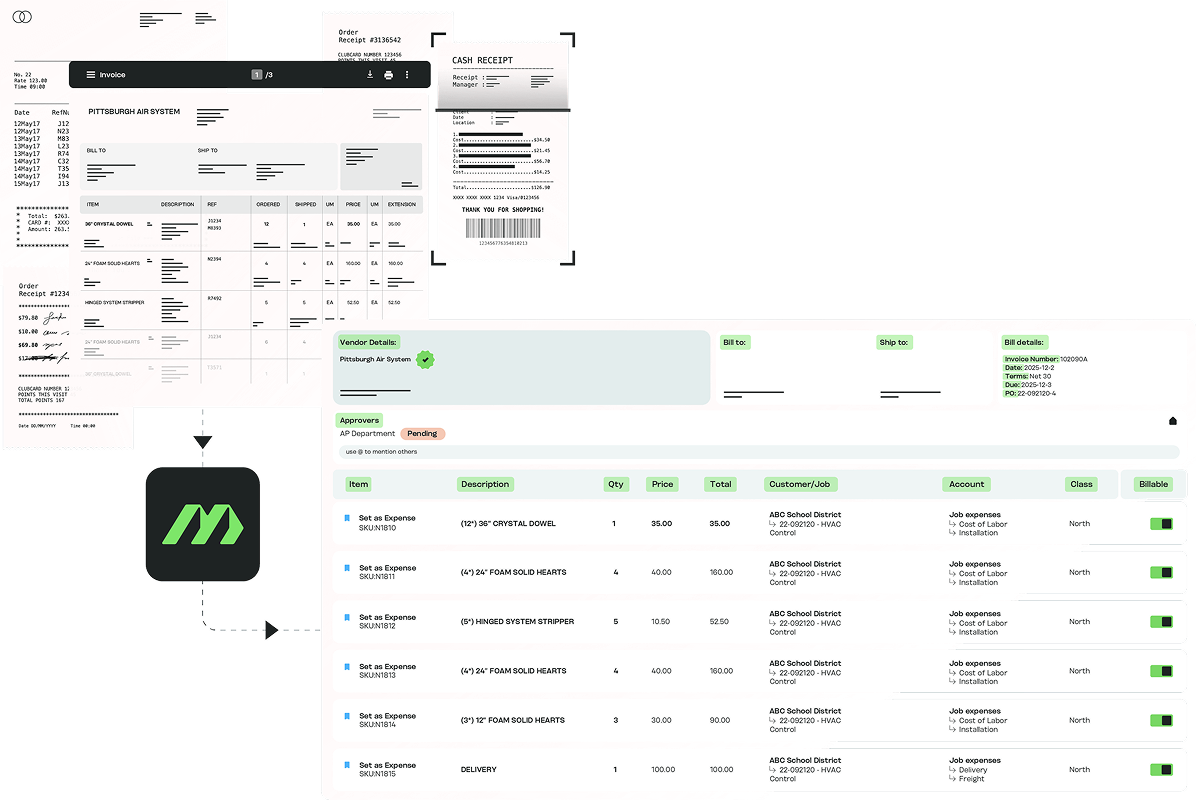
Every line coded to the right project, location or entity
MakersHub reads every part of every bill, every line included, and codes each line to the right job, phase, cost code, class or entity as it reads. BILL reads at the header, so the line detail job costing needs stays a manual step.
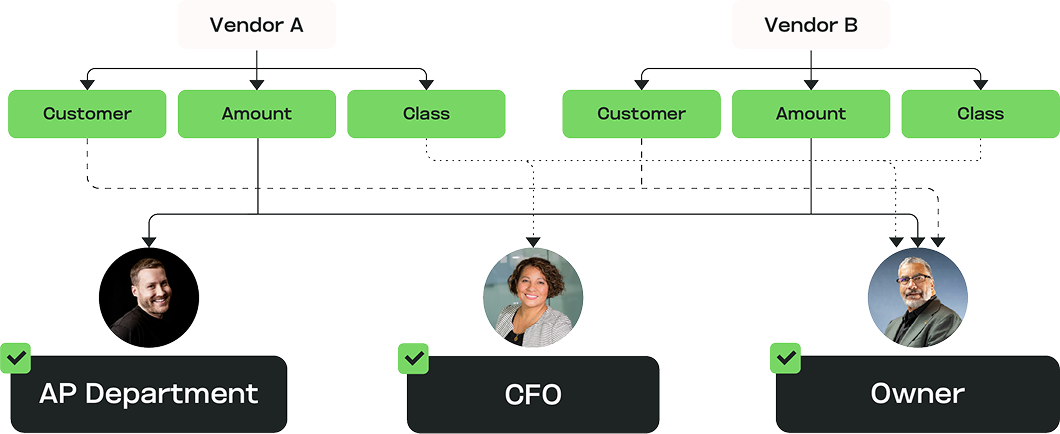
Approvals that match how you actually work
Approval is routed against the coded cost, so each bill reaches the person responsible for that project, location or entity, with the coding attached.
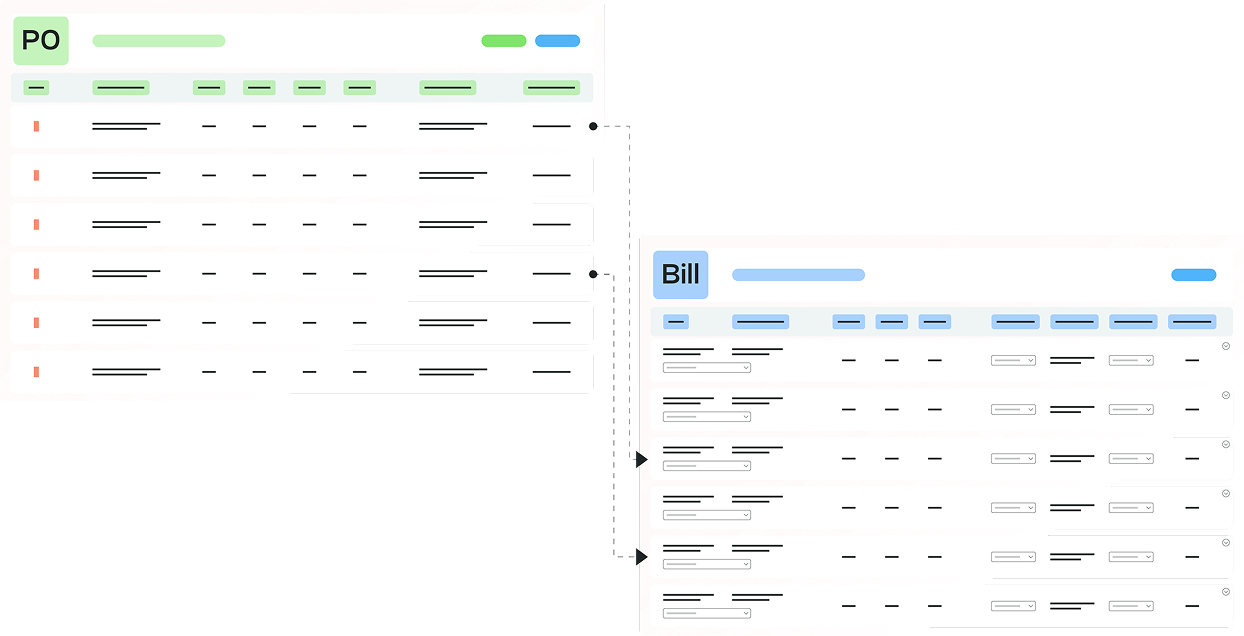
Rules you set in plain language
Tell MakersHub how to handle a bill once, in plain words, and it saves that as a rule it reuses. BILL has no equivalent, so coding stays manual or template-bound.
What teams see after moving AP to MakersHub
saved per month.
Cahill Construction.
less AP time.
O.Z. Enterprises.
faster month-end close.
Liberty Fence.
How does MakersHub compare with BILL?
Most AP tools start at the payment. MakersHub starts at the data.
MakersHub
Bill
Core focus
Best for growing businesses that track spend by project, location, program or entity, with every line of every bill coded to the right one and approved before it's paid.
AP/AR plus spend and expense; built for a broad SMB base.
Line-item capture
Reads every part of every bill, every line included: SKUs, quantities, unit prices and job or project codes.
Reads at the header; line-level detail is limited.
Job, phase and cost-code coding
Codes each line to the right job, phase, cost code, class or entity.
Passes class (department) and customer:job through from your GL; GL/header-oriented, not built for construction job costing.
Line-level PO and receipt matching
Two- and three-way matching, line by line, so discrepancies surface before the bill posts to the ledger.
Two- and three-way matching against POs and receipts.
Multi-entity / client book
One platform across every entity. Routes each bill to the right entity by vendor, bill-to, ship-to or PO number, with consistent coding and approvals throughout.
Multi-entity management with a parent company, cross-entity payments, and intercompany entries; accounting sync is still managed per entity.
QuickBooks integration
Every version: Online, Desktop via Web Connector, Enterprise, hosted environments and Intuit Enterprise Suite.
Online and Desktop.
ERP sync depth
Direct two-way sync with QuickBooks, Intuit Enterprise Suite, NetSuite, Sage Intacct and Xero, line by line, not just the bill header.
Direct integrations; two-way sync of lists (accounts, vendors, classes, items) with your ERP.
Rules from plain language
Tell MakersHub how to handle a bill once, in plain words, and it saves that as a rule for every future bill. Coding questions get answered before approval.
AI-assisted coding and anomaly detection; no plain-language rule setup.
The capabilities described above reflect BILL’s current public documentation as of October 2026. Pricing changes often, so confirm plans and specifics with BILL before you buy.
Teams that made the switch
"BILL is fine if you just need a simple bill pay tool. But when you have high volume and complex needs, it starts to break down. We needed better controls for approvals and payment authorization, and more visibility into all that data."


Michael Newberger
Owner, Outsourced Financial Operations, LLC
Read more stories

Switching from BILL isn’t a rebuild
MakersHub sits on your accounting system and syncs both ways. Onboarding is hands-on, initial setup about an hour. You keep your GL, vendors and history.
MakersHub syncs two ways with QuickBooks, Intuit Enterprise Suite, NetSuite, Sage Intacct and Xero.
Yes. MakersHub reads every line of every bill and codes each one to the right job, phase, cost code, class or entity. It matches each line to the purchase order, so discrepancies surface before the bill posts to the ledger, and routes approval to the person responsible for that cost.
Line-level detail, custom approval logic and per-user pricing that climbs as they grow.
BILL is built to pay the bill. MakersHub uses everything on the bill to get the cost and the review right before it's paid.
Best for growing businesses that track spend by project, location, program or entity, with every line of every bill coded to the right one and approved before it's paid. It's built for businesses whose spend splits across projects, locations, programs or entities, including construction firms, manufacturers, trades businesses and accounting firms.
MakersHub codes every line and shows it to a reviewer before it posts. One correction teaches it for every future bill from that vendor.
See what MakersHub does with your bills
Book a 30-minute walkthrough on a real bill from your business.