

See What Every Dollar Is Doing, and Where the Next One Should Go
MakersHub is AP automation for organizations that track spend by project, location, program or entity. Every bill is coded to the project, location or entity it belongs to before it's paid, and nothing leaves the bank outside the authorization rules you set.
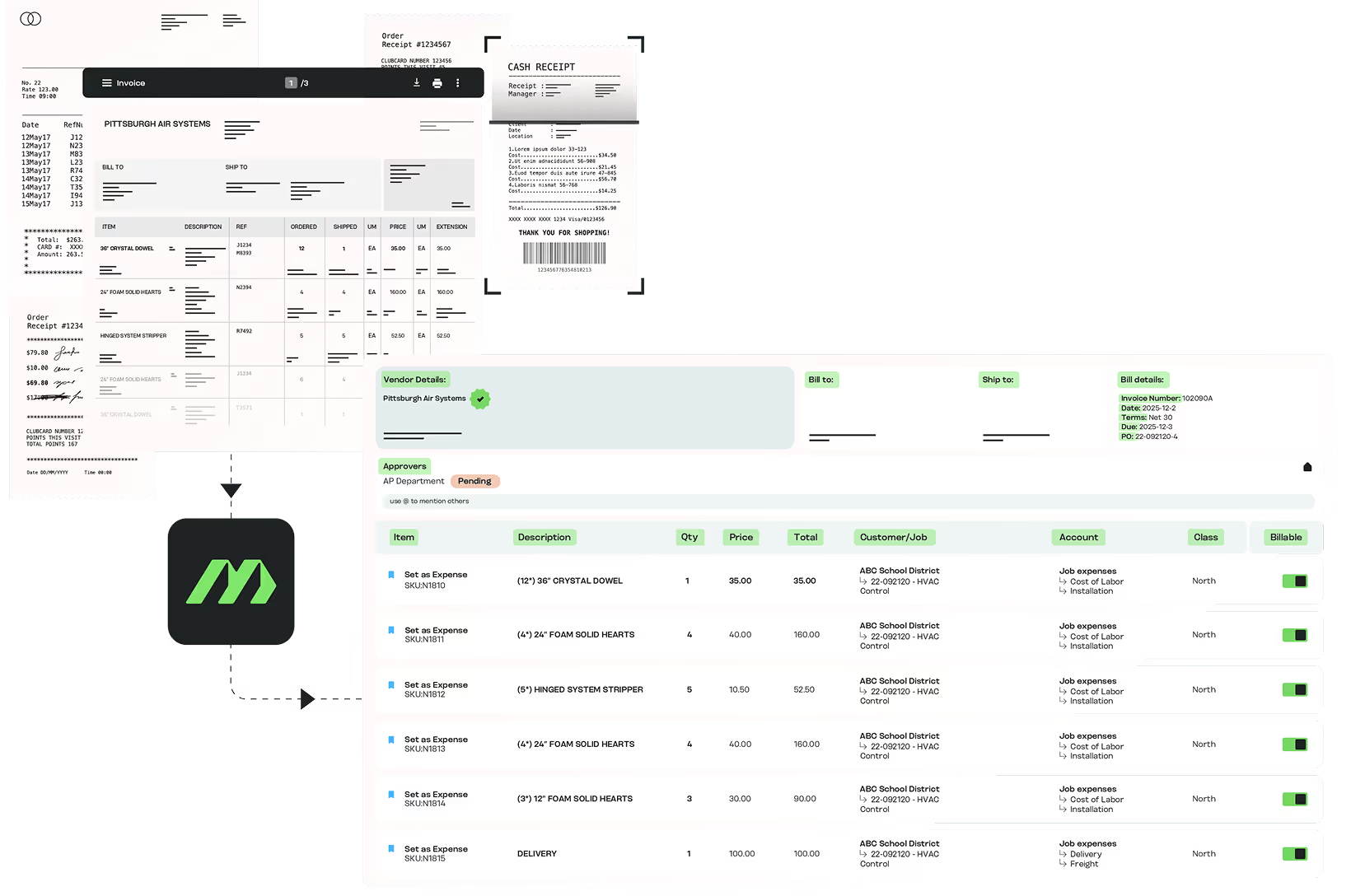

Built for How You Control Cash

You own financial controls
You set the rules for approvals and payments. You are not the daily user, but nothing should move outside your policy.

You’re fractional or outsourced
You run finance for several companies and need one control model that holds across all of them.

You inherited AP without controls
New in the seat, and AP runs on email approvals, a shared bank login and no audit trail.
Where Control Breaks Down

You can’t see what each project or location costs
Spend gets coded in bulk or late, so what each project, location or entity really cost only shows up at month-end.

No single view
Approvals live in email, payments in the bank portal, records in your accounting system. No one view shows what is committed, approved and scheduled.

Payments leave without your sign-off
Whoever releases the payments controls the cash. Bills get paid that you never approved, and you only find out when the money is gone.

Cash flow is a guess
Bills sit in an inbox for weeks, so payables are understated and a run of due dates arrives as a surprise. Nothing is validated before it posts to the ledger.

Fees nobody tracks
Bank and wire fees, missed early-payment discounts, rush payments and AP provider price increases add up quietly without anyone knowing the true cost.
How Do I Stop Payments Leaving Without the Right Approval?

Know what’s approved, scheduled, and paid in one view
MakersHub keeps bill approval and payment release as separate steps, each held by people you choose. Nothing reaches your ledger until it is validated, and nothing leaves the bank until it clears your rules. The whole payable lifecycle runs inside those two gates.
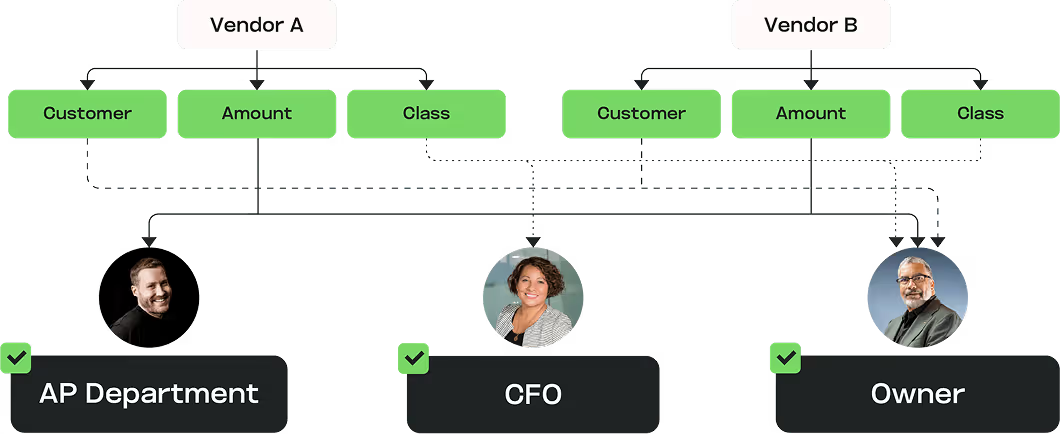
Approving a bill and releasing the money are separate decisions
You set who can do each. Confirm the bill is valid, then authorize the payment. Nothing crosses that line outside your controls.
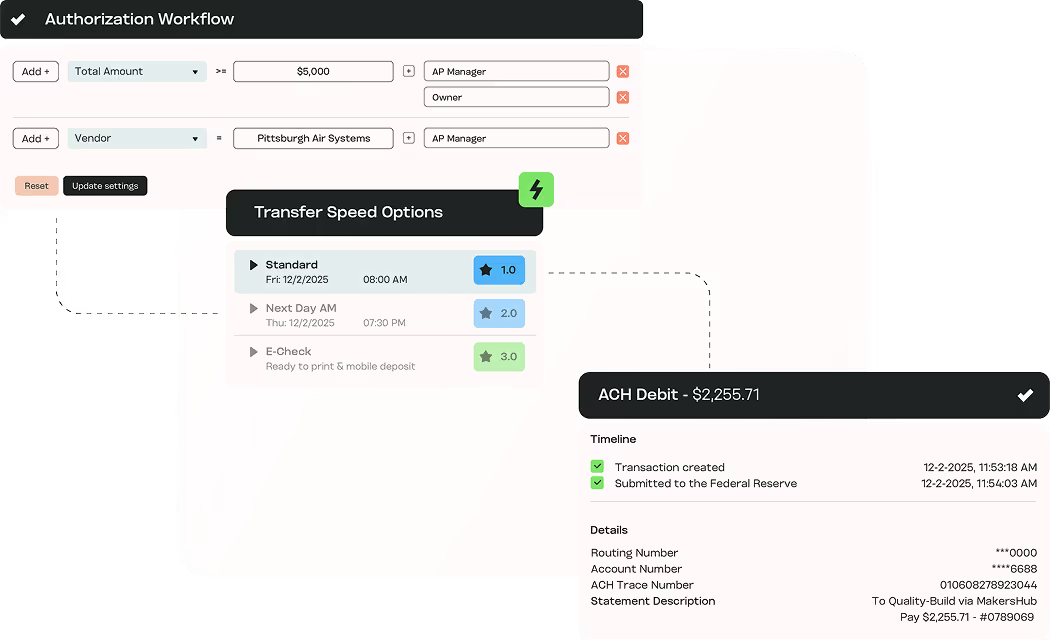
Vendor bank changes, locked down
Vendors enter their own bank details through a secure portal, which your team verifies. A new account can't receive a payment until that verification occurs. Only people you choose can add or change a vendor's bank details, and every change is logged with who made it and when. Payments above a user's limit wait until everyone your rules require has signed off.
Outcomes You Can Measure

One place for every payable
What is committed, approved, scheduled and paid, in a single view.

Scale without headcount
“The work of processing bills has decreased by 10X.” Michael Newberger, Outsourced Financial Operations

Cash-flow control
Payments scheduled to their due dates and sent by ACH instead of wire, so rush fees stop and early-payment discounts get flagged in time.
Map your approval and payment rules in 30 minutes.
Connects to the Systems You Already Run




CFOs Who Got AP Organized
“We process a high volume of AP invoices every month, and MakersHub makes it all simple. Approvals flow smoothly, payments go out fast, and the platform is genuinely easy for everyone to use.”

Heather Walker
CFO
Center Point Construction
How MakersHub compares
MakersHub
Ramp
BILL
Core focus
AP-first, for growing businesses that track spend by project, location, program or entity.
Card and spend platform; Bill Pay (AP) is an add-on module.
AP/AR plus spend and expense; built for a broad SMB base.
Line-item capture
Reads every line of every bill and maps each line to your chart of accounts as it's captured — all fields including SKUs, quantities, and job/project codes.
AI/OCR captures header and line-item detail; coding is card/expense-first.
Header level capture, unreliable at line level.
Job, phase and cost-code coding
Codes each line to the job, phase, cost code, class, or customer as it reads the bill — purpose-built for job-cost workflows.
Limited mapping to class, customer/job, and custom dimensions, applied after capture; not a purpose-built job-cost model.
Passes class (department) and customer:job through from your GL; GL/header-oriented, not built for construction job costing.
Line-level PO and receipt matching
2- and 3-way matching at the line level, applied as the bill is read — no separate procurement module or PO-origination constraints.
2- and 3-way line-item matching, via the Procurement module; PO import limited to NetSuite, Sage Intacct, and QuickBooks Online (not Desktop).
2- and 3-way matching against POs and receipts.
Multi-entity / client book
One platform across every entity. Routes each bill to the right entity by vendor, bill-to, ship-to, or PO number, with consistent coding and approvals throughout.
Multi-entity supported (Enterprise tier); on QuickBooks Online, each entity connects as a separate Ramp account/company.
Multi-entity management with a parent company, cross-entity payments, and intercompany entries; accounting sync is still managed per entity.
QuickBooks Integration
Every version: Online, Desktop via Web Connector, Enterprise, hosted environments, and Intuit Enterprise Suite.
Online and Desktop — but Desktop is via manual IIF file export/import, not a live sync.
Online and Desktop.
ERP sync depth
In-house, direct integrations with QuickBooks, Xero, Sage Intacct, NetSuite, IES, and custom via API. Syncs every line item, not just the bill header.
Direct integrations largely via flat file data exchange.
Direct integrations; two-way sync of lists (accounts, vendors, classes, items) with your ERP.
WiseVision reasoning layer
Auto-codes every line, flags exceptions, and answers questions in plain language from your bills. Agentic Bill data transformations & Integration mapping rule configuration, and more.
AI agents auto-code and flag anomalies; plain-language querying is procurement-oriented.
AI-assisted coding and anomaly detection; no conversational reasoning layer over your books.
FAQs
Vendors enter their own bank details through a secure portal, and MakersHub is the payer of record. You set thresholds and required approvers, and releases above a limit need a second authorization, so a changed bank detail can't move money on its own.
Yes. You can set approval and payment rules by the categories your books use, and every release is logged on a record that can't be edited.
Yes. MakersHub is SOC 2 Type II certified, with Positive Pay protection on check payments and encrypted collection of vendor bank details.
Nothing Moves Without Your Rules
Money leaves the business on your rules, not on whoever ran the payment batch. You stop logging into the bank portal to check.
Bring one bill. Watch it get coded, approved and released on your rules.